Synthetic Data Generation (SDG) for Traffic Scenarios
Authors: Aidan Ladenburg • Adityan Jothi Organization: NVIDIA
| Model | Workload | Use Case |
|---|---|---|
| Cosmos Transfer 2.5, Cosmos Reason 1, CARLA Simulator | End-to-End | Photorealistic synthetic data generation for traffic scenarios with VLM fine-tuning |
Prerequisites: This workflow requires specific API keys, system requirements, and workflow inputs. See the Prerequisites section below before starting.
Overview
This recipe demonstrates how to utilize Cosmos models for generating photorealistic synthetic data for urban traffic scenarios. The workflow is designed to accelerate the development of perception and vision-language models (VLMs) for smart city applications.
Why use SDG?
In areas where the highest model accuracy is vital, finetuning on domain specific data is essential. Synthetic data generation and augmentation offer an easy and scalable way to collect this data to your exact specifications. However, there are significant challenges associated with creating diverse, photorealistic training data from simulators:
- Domain Gap: While simulators provide perfect ground truth and controllable scenarios, their synthetic appearance creates a substantial domain gap that limits the performance of models trained on simulator data when deployed in real-world environments.
- Scalability Constraints: Manually crafting diverse scenarios in simulators requires substantial engineering effort and computational resources, making it prohibitively expensive to scale up data diversity.
- Limited Visual Realism: Traditional simulator outputs lack the photorealistic quality needed for robust real-world model deployment, requiring additional post-processing or domain adaptation techniques.
This workflow provides a recipe to:
- Simulate customized traffic scenarios using CARLA
- Ground-truth extraction from simulation (RGB, Depth, Segmentation, Normals, 2D/3D bounding boxes, events)
- Use COSMOS-Transfer to generate photo-realistic augmentations that bridge the sim-to-real gap
- Help scale synthetic data with customizable augmentation variables
- Generate post-training datasets for model fine-tuning
- SoM-aware post-processing to preserve object correspondence across modalities
- Q&A Caption generation for VLM post-training
The output of this recipe is designed to offer a simple hand-off for further fine-tuning and deployment.
Refer to the Cosmos Cookbook Intelligent Transportation Fine-tuning Guide and VSS documentation for Deployment guides.
Prerequisites
Obtain API keys
⚠️ Security Warning: Store API keys in environment variables or secure vaults (e.g., HashiCorp Vault, AWS Secrets Manager). Never commit API keys to source control or share them in plain text.
- NGC API key
- Steps to setup HERE
- Hugging Face Token:
- Ensure your Hugging Face token has access to Cosmos-Transfer2.5 checkpoints
- Get a Hugging Face Access Token with Read permission
- Install Hugging Face CLI
- Login with
hf auth login. - Read and accept the NVIDIA Open Model License Agreement
- Read and accept the terms for Cosmos-Guardrail1
- Read and accept the terms for Cosmos-Transfer2.5
Workflow Inputs
The SDG workflow requires 3 unique inputs: maps, scenario logs, and sensor config. This repository provides a small number of examples for each, from Inverted AI (see step 2 of quickstart). Please see the following sections for descriptions and ways to generate your own.
Maps
A map includes both the 3D model of a location and its road definition. A map's road definition is based on an OpenDRIVE file. CARLA provides a set of pre-built maps that can be used for building and testing this SDG workflow. Further details about maps and their elements can be found here. To create a digital twin of a real-world location, a plugin with a CARLA bridge from AVES Reality can be used.
Scenario Logs
Along with the map, the workflow requires a scenario log. This file defines the list of actors (vehicles and pedestrians) and exactly how they move during playback, e.g. collision, wrong way driving. CARLA provides a set of vehicle assets to use in the simulation.
- To generate scenarios with simple, randomized traffic, please refer to the CARLA quick start guide
- Complex scenarios can be created using third-party tools. One such tool is RoadRunner from Mathworks. There are also providers like InvertedAI who can generate scenarios based on your requirements.
Scenario simulation can be recorded and saved as a CARLA log file (in custom binary file format). The log file can then be played back, queried, and used to generate ground truths. See the Scenario Configs section for recorder details and helpful Python scripts for this purpose.
The scenario logs used in this repo can be found HERE
Scenario Configs
To generate the ground truths, the SDG workflow needs to know the location of the various CARLA sensors, and their attributes. The camera config (.yaml) defines a list of sensors to place (rgb, depth, seg, etc.) and their location, angle, and quality. The log config (.json) provides a scenario ID as well as information on recording duration and start-time. Please refer to the provided samples for details.
System Requirements
- Linux with NVIDIA GPU and drivers
- Docker Engine 28.0+ and Docker Compose v2
- NVIDIA Container Toolkit (GPU access)
- Git LFS (Large File Storage)
- Internet access for pulling images and model weights
- 250 GB Storage
- 4x RTX GPUs (80+GB Vram)
Optional:
- X11 if you need on-screen rendering for CARLA; the stack defaults to offscreen rendering but mounts X11 by default for flexibility
Workflow Usage
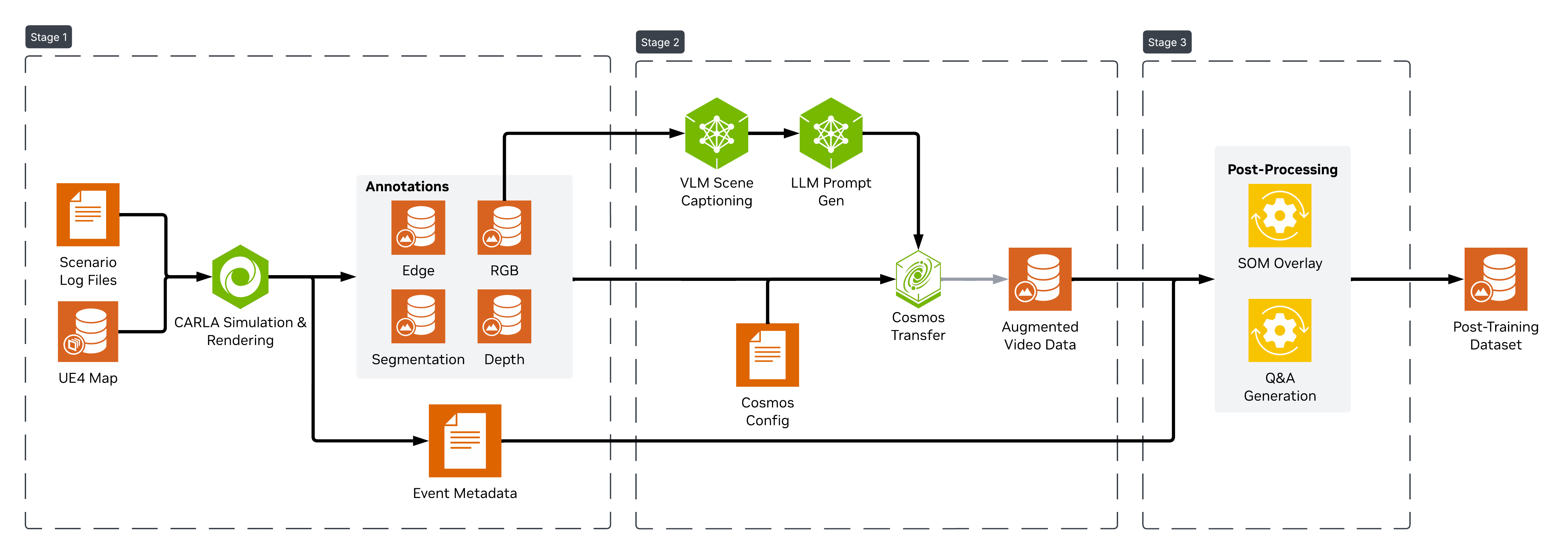
This recipe operates in three distinct stages: Simulation, Augmentation, and Post-processing, and there are 4 endpoints required to complete them (Carla, VLM, LLM, Cosmos Transfer). This section will cover high level usage assuming all endpoints are active. Please refer to the quickstart for help with spinning up the endpoints and the Github for a guided experience using a docker compose and jupyter notebook.
Stage 1 - Generating GT with Carla Simulation
This workflow uses the open source Carla simulator to simulate various kinds of traffic patterns and incidents at a variety of map locations. The current SDG release is based on Carla 0.9.16. This stage takes in 3 pieces of information: An unreal engine map to run the simulation in, a scenario log (.log) containing the actor playback information (car/pedestrian movements), and a sensor config that defines where the cameras are placed and what info they should record (.json / .yaml). Samples of all 3 of these files can be found in this repo for your convenience. For information on creating your own scenario files see workflow inputs.
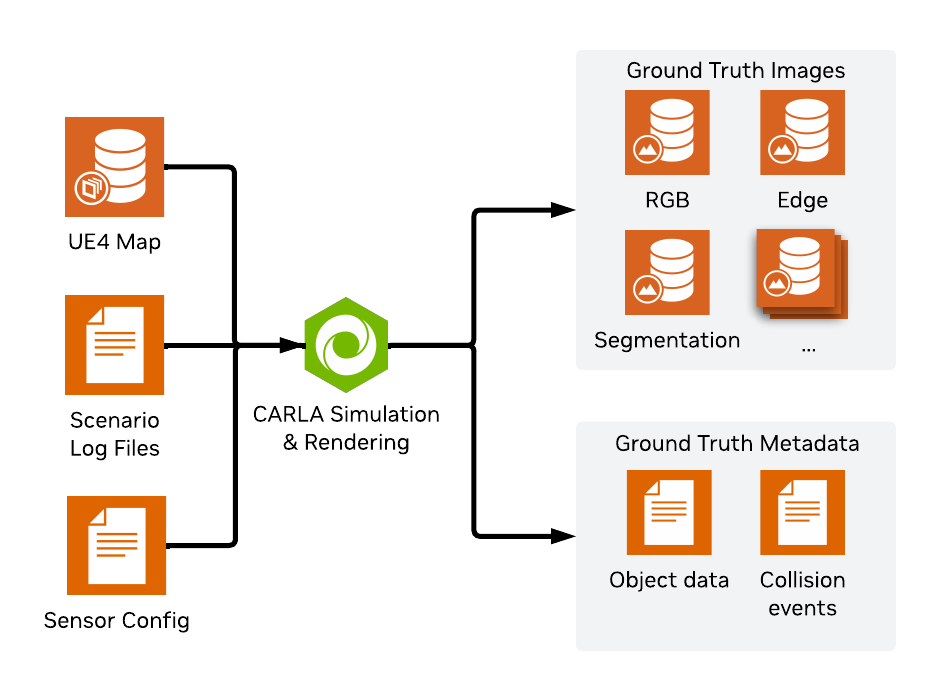
Before running the log simulations, you have the option to customize a few settings in a global config. Please reference the Carla Documentation for more info on specific variables.
{
    "host": "localhost",
    "port": 2000,
    "timeout": 360.0,
    "time_factor": 1.0,
    "generate_videos": true,
    "limit_distance": 100.0,
    "area_threshold": 100,
    "class_filter_config": "config/filter_semantic_classes.yaml",
    "ignore_hero": false,
    "move_spectator": false,
    "detect_collisions": true,
    "output_dir": "/path/to/output_dir"
}
With the carla server running on the host and port set in the global config specified above, you can run the simulation for a single log file like so:
python modules/carla-ground-truth-generation/main.py \
            --config /path/to/log_config.json \
            --recorder-filename /path/to/log_file.log \
            --camera-config path/to/camera_config.yaml \
            --wf-config /path/to/global_config.json \
            --output-dir /path/to/output_dir \
            --target-fps 30
See the workflow inputs section for more details on what each of these files provide.
After generation is complete you should have a set of ground-truth images:
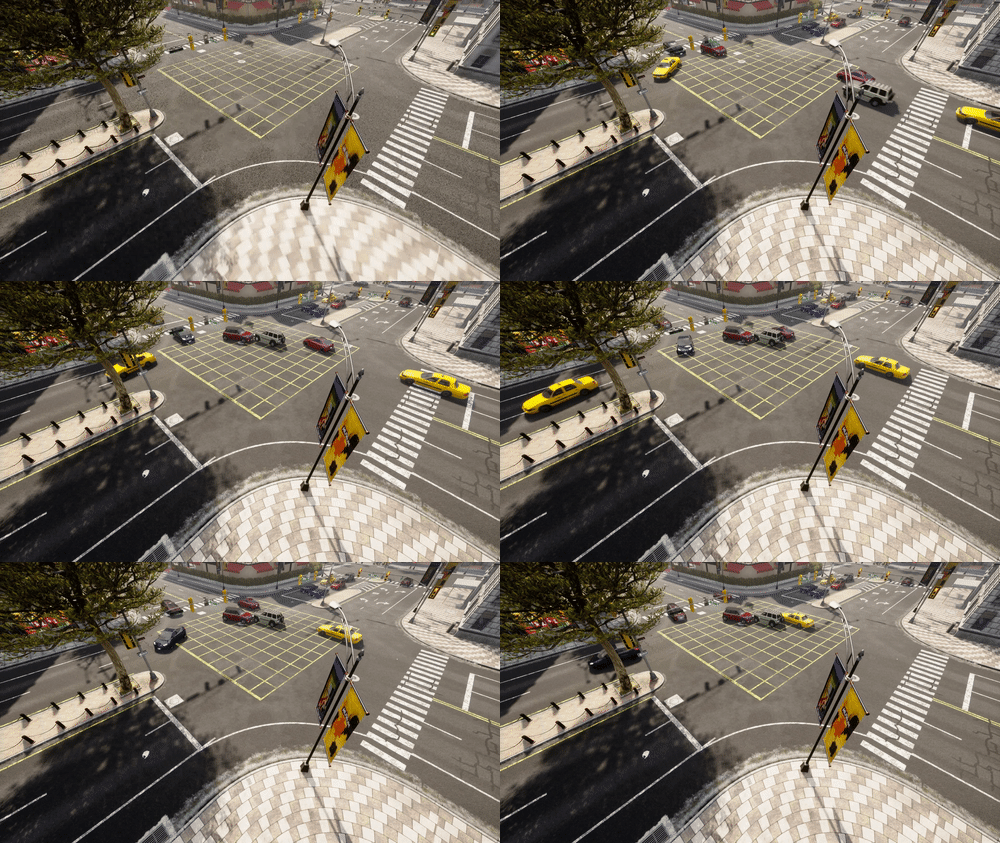
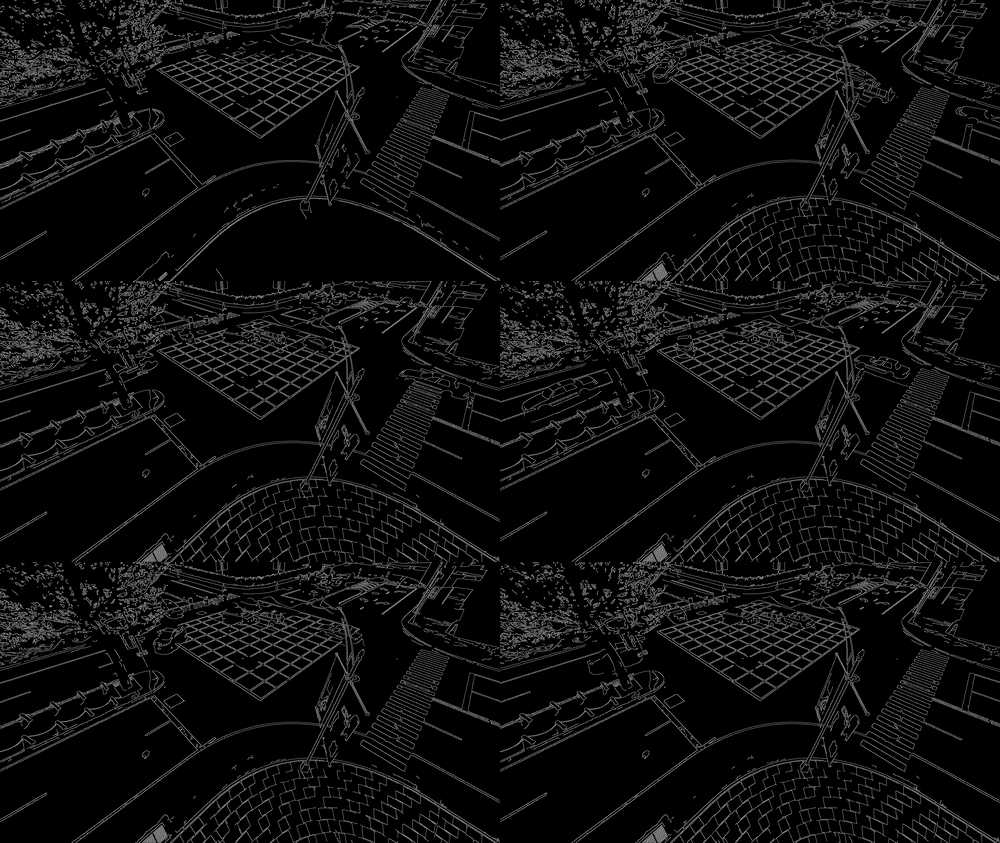
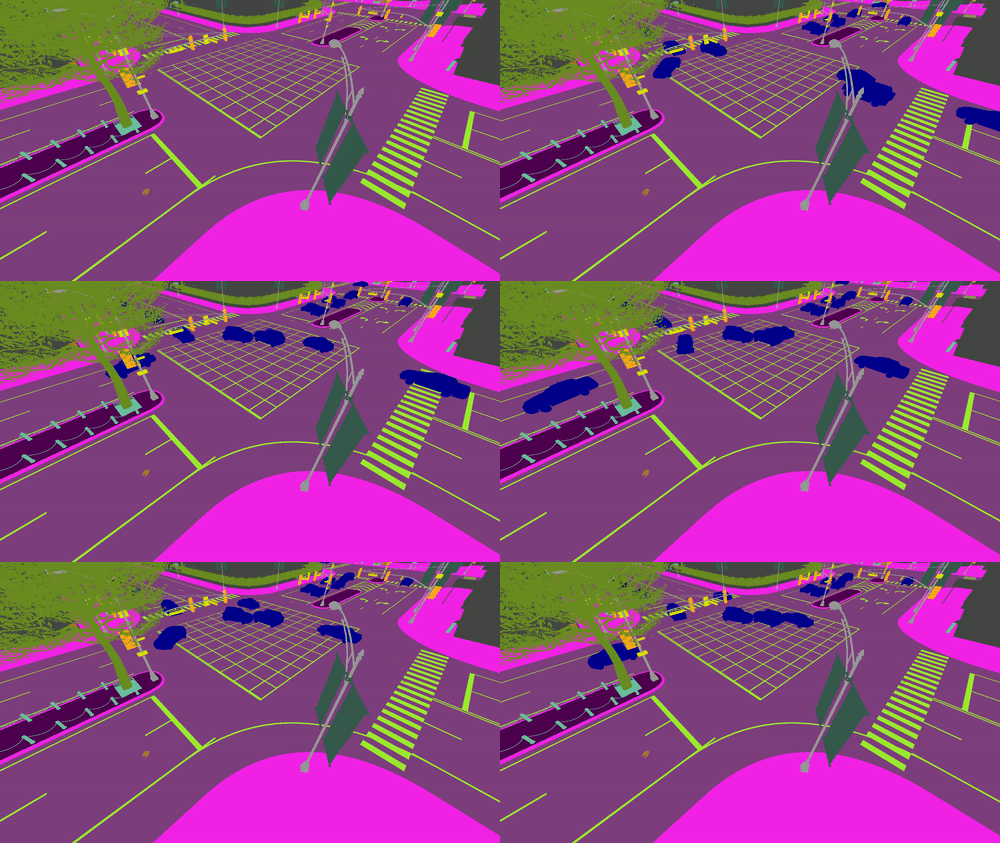
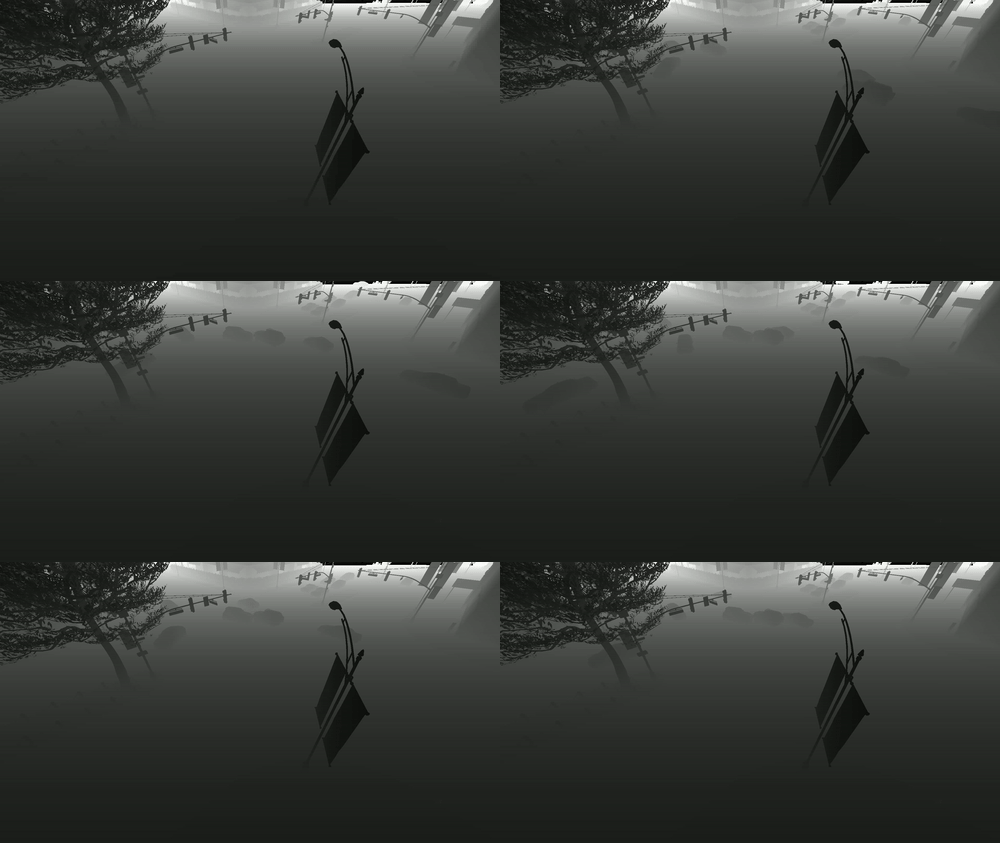
In addition to to images, the simulation records other data such as masks, bbox, collisions, etc. This data can be directly taken for use in fine-tuning or training tasks, or further augmented in the next stages of the workflow.
Stage 2 - Creating augmented data from ground-truth
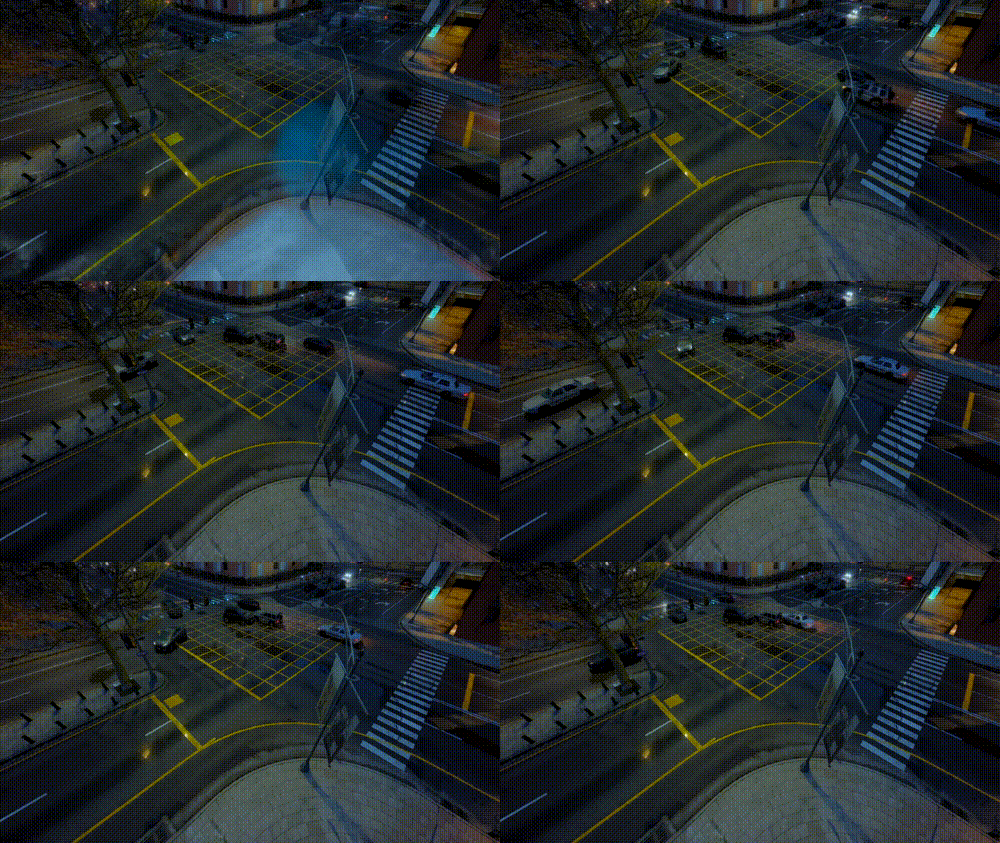
For stage 2, we'll take the ground truth data generated by Carla and augment it to expand our dataset variety. This is done in 3 steps. First, the input video is captioned using Cosmos Reason 1. This gives us a detailed caption that captures attributes such as lighting, physical events, etc. Next, we can generate variations on this prompt using an LLM. The goal is to preserve all the core elements of the scene changing just a few attributes at a time, such as time of day or weather. This step can be repeated as many times as we like, creating a new augmented scene caption for each. Finally, we can pass these augmented prompts along with the ground-truth data to Cosmos Transfer 2.5 to generate a new augmented videos.
Prompting for this stage can also be done manually, although this is not recommended for larger batches of augmentations. For a more in-depth usage guide for Cosmos Transfer see CARLA Sim2Real Augmentation Guide
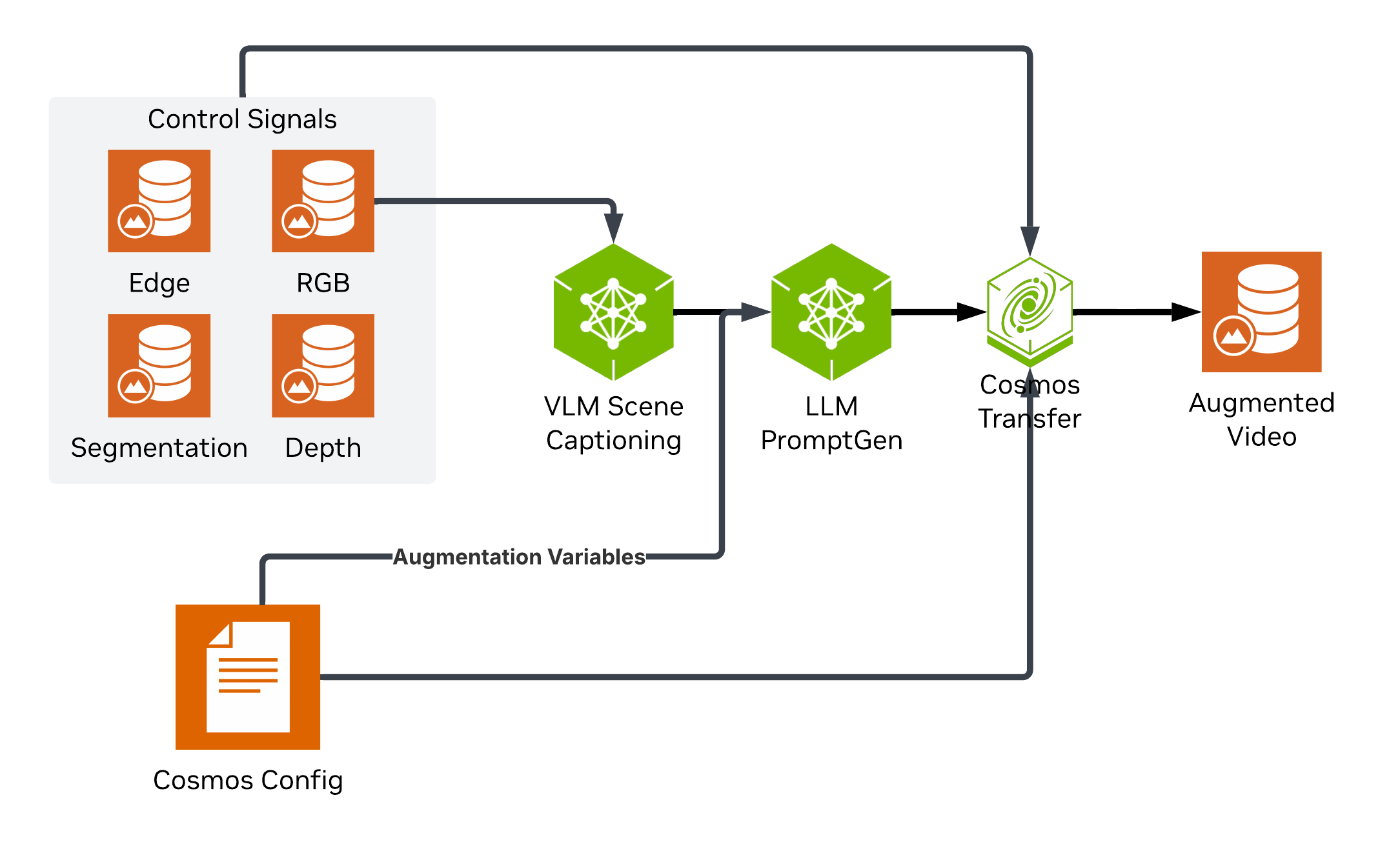
To control the Cosmos Transfer generation you can put together a simple config file defining the captioning prompts, and augmentation variables to use. At runtime, one variable will be chosen randomly from each of the lists to generate the augmented caption and video. Below is a cut down version of the configuration see the sample config on the github for the full spec.
data:
- inputs:
    rgb: /path/to/Carla-GT/rgb.mp4
    controls:
      edge: /path/to/Carla-GT/edges.mp4
  output:
    video: /path/to/output.mp4
endpoints:
  vlm:
    url: http://localhost:8001/v1
    model: nvidia/cosmos-reason1-7b
  llm:
    url: http://localhost:8002/v1
    model: nvidia/nvidia-nemotron-nano-9b-v2
  cosmos:
    url: http://localhost:8080/
    model: Cosmos-Transfer2.5-2B
video_captioning:
  user_prompt: 'Analyze the traffic intersection surveillance footage and generate a detailed description of the visual elements...'
  variables:
    weather_condition: ['clear_sky', 'overcast', 'snow_falling', 'raining', 'fog']
    lighting_condition: ['sunrise', 'sunset', 'twilight', 'mid_morning', 'afternoon', 'zenith', 'golden_hour', 'blue_hour', 'night']
    road_condition: ['dry', 'snow', 'sand', 'puddles', 'flooding']
cosmos:
  executor_type: gradio
  model_version: ct25
Once the config has been set you can generate your augmented videos:
Augmentations sunrise vs night:
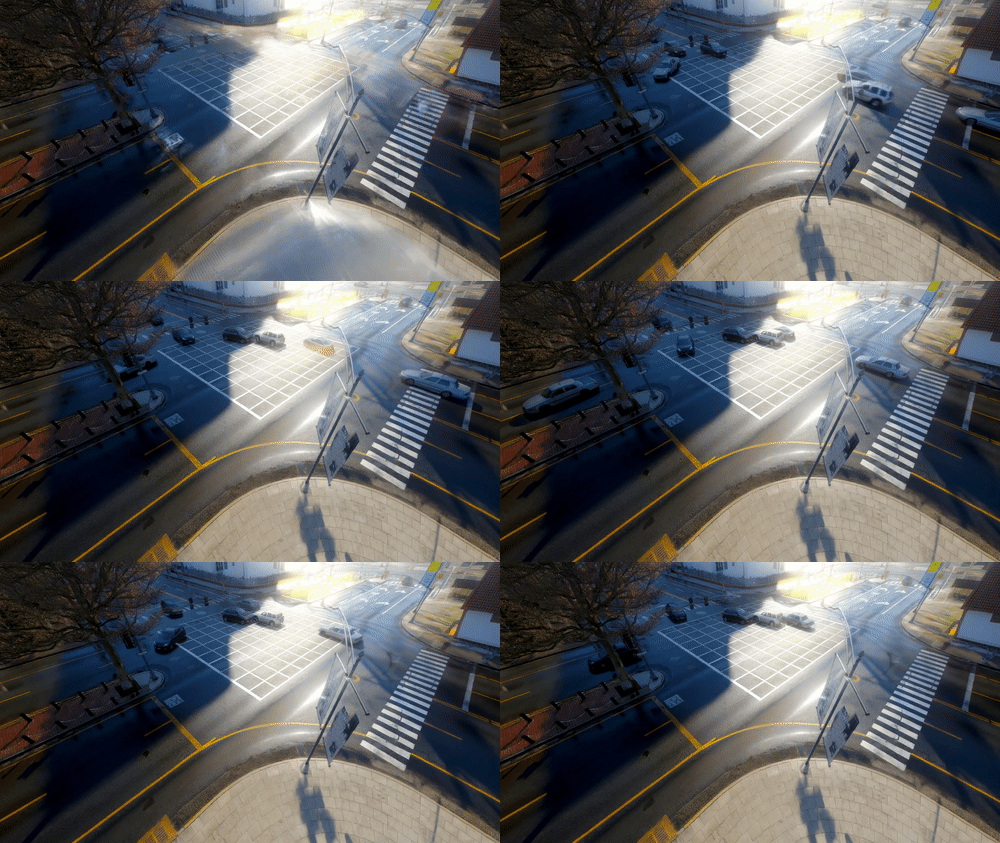
Stage 3 - Processing data for post-training tasks
At this point, we have successfully created a ground-truth dataset, and augmented it to increase variety. The final step is to package all this information up for actual use in model training or fine-tuning. To do this we'll perform 2 actions: generate SOM overlays and Q&A pairs.
SOM (set of marks) is a structured labeling approach where points of interest are annotated with discrete marks or identifiers. In our case we will add bounding boxes as well as numeric IDs to specific cars involved in the incident. These additional labels help ground the VLM, improving the quality of fine-tuning.
Q&A pairs are text prompts and responses automatically generated from the ground-truth data. They provide a useful mechanism for fine-tuning VLMs by enabling the model to learn from the dataset in a semi-supervised or self-supervised manner.
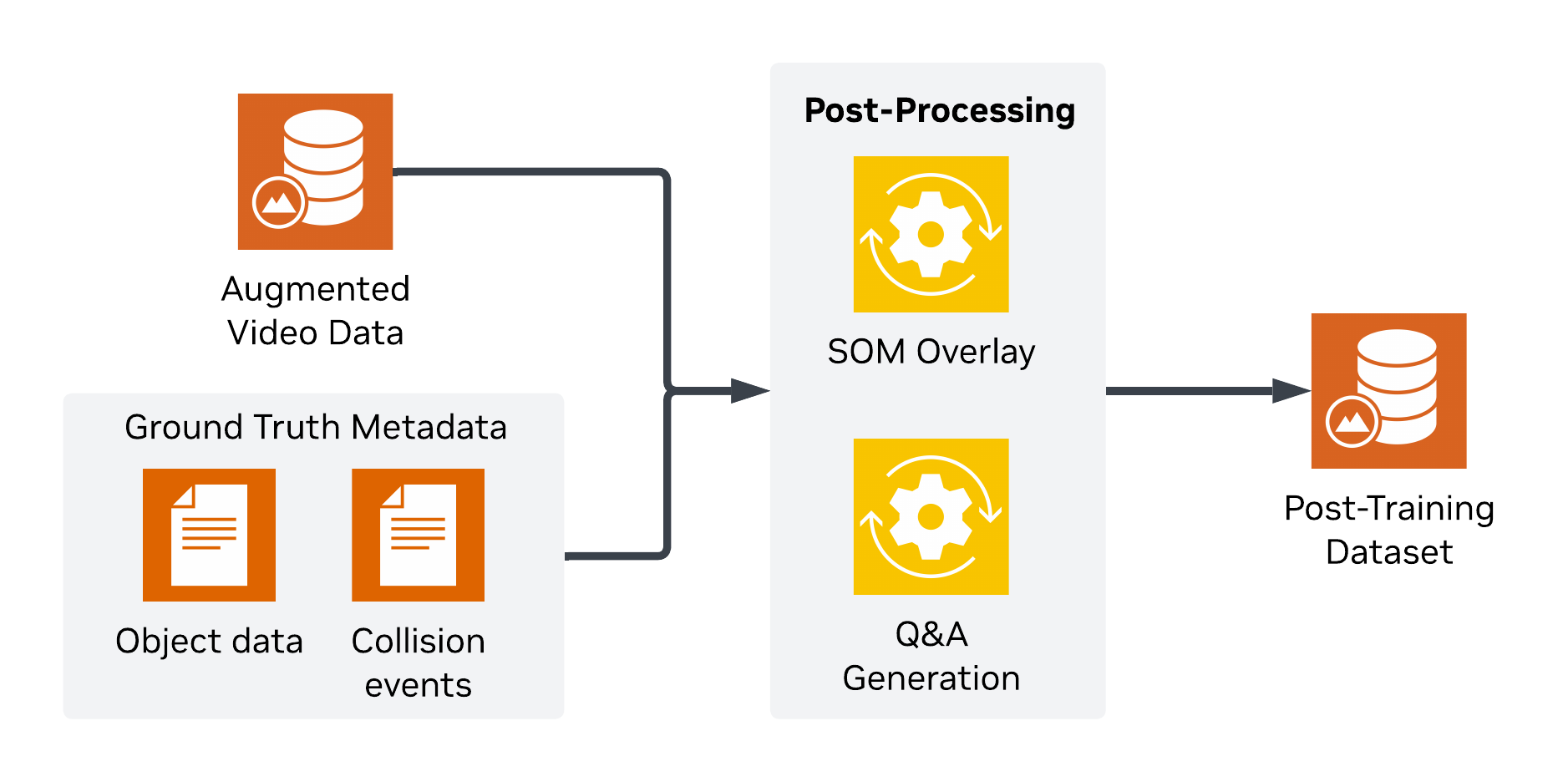
To overlay the ground-truth bbox data you can simply pass in the augmented video along with it's corresponding ground-truth data generated in stage 1.
python modules/carla-ground-truth-generation/som.py \
      --input-video /path/to/Cosmos-outputs/augmented.mp4 \
      --odvg-dir /path/to/Carla-GT/bbox_odvg \
      --output-video /path/to/SOM.mp4
Overlayed Video:

Using our overlayed videos, we can generate a Q&A dataset for finetuning a VLM. Since we know which vehicles are involved in incidents we can create a large number of simple yes or no questions grounded in our videos.
python modules/postprocess/postprocess_for_vlm.py \
                --carla_folder /path/to/Carla-GT \
                --cosmos_folder /path/to/Cosmos-outputs \
                --output_folder /path/to/output \
                --run_id 1
Q&A format:
"id": "events_collision_rgb_som.mp4",
"video": "events_collision_rgb_som.mp4",
"conversations": [
{"from": "human",
"value": "Is there a car collision between vehicles with numeric IDs 968 and 970? Your final
answer should be either Yes or No."},
{"from": "gpt",
"value": "Yes"}
]
Quickstart (Docker Compose)
-
Clone the repository
-
Download sample CARLA logs
Note: Sample logs are provided by Inverted AI. Please review the data terms of use to determine whether they are appropriate for your purposes. If you have your own data you may skip this step and place it under
./data/examples/ -
Set up the deployment configuration.
You need to provide your NGC_API_KEY with access to pull images from build.nvidia and Hugging Face Token with access to the checkpoints mentioned under Prerequisites. The other parameters are optional to configure GPU IDs that each NIM/service should run on, and ports to launch the NIMs on. By default, they assume a homogeneous deployment to a system with at least 4x RTX 6000 Pro or equivalent.
-
Deploy the stack.
The deployment script automatically performs prerequisite checks before starting containers:
- GPU availability: Verifies NVIDIA GPUs are detected and accessible
- NVIDIA Container Toolkit: Confirms GPU access from containers is configured
- Port availability: Checks that required ports (8001, 8002, 8080, 8888, 2000-2002) are not already in use
- Docker and Docker Compose: Verifies required tools are installed and Docker daemon is running
If any critical checks fail, the script will exit with clear error messages. Address any issues before retrying deployment.
There are two main deployment options available:
- Homogeneous Deployment: This mode launches all NIM services (VLM, LLM, Cosmos-Transfer) and the Workbench on a single machine (default, no extra arguments). It is recommended for systems with at least 4 suitable GPUs (RTX support and 80+ GB VRAM). Simply run
./deploy.shto start the entire stack locally.
# On the target machine
./deploy.sh

# This spins up the Cosmos-Reason1, Nemotron NIMs, Cosmos-Transfer2.5 Gradio Server, CARLA Server, and the Jupyter notebook, which users can follow to generate photo-realistic synthetic data for VLMs.
# By default these are the ports where all of the services get deployed to.
# Workbench → http://<host>:8888
# NIMs: VLM http://<host>:8001, LLM http://<host>:8002, Cosmos-Transfer http://<host>:8080
Note: On the first run, you may see warnings such as "pull access denied for
smartcity-sdg-workbench" or for the Transfer Gradio container. This is expected and harmless—the required images are built locally bydeploy.shduring initial setup.- Heterogeneous Deployment: This mode allows you to run the NIM stack (VLM, LLM, Cosmos-Transfer) on one machine and the Workbench (with CARLA) on another, using the
nimandworkbencharguments respectively. This is useful if you wish to distribute resource usage across multiple hosts. You'll need to set theNIM_HOSTenvironment variable on the Workbench node to point to the NIM node.
The NIM stack requires a machine with 3 GPUs with 80+ GB VRAM (Ampere or later) to launch the 3 inference endpoints using the command below:
Once the NIM stack is up, launch the CARLA server and notebook/workbench stack, which requires at least 1 RTX-compatible GPU (L40/RTX 6000 Pro or equivalent) using the following command:
# On the second machine, ensure steps 1-3 are complete to have the repository and configuration ready before this step.
# The deployment script sources `deploy/compose/env`, where `NIM_HOST` defaults to `localhost`. This will override any previously exported `NIM_HOST`. Before running `./deploy.sh workbench`, edit `deploy/compose/env` and set `NIM_HOST=<ip_of_nim_node>`. The script will prompt you to confirm the detected value.
cd deploy/compose
./deploy.sh workbench
Choose the option that best fits your available hardware and workflow needs.
-
Verify deployment and start using the system
Note: On first deployment, NIMs require several minutes to download model checkpoints and initialize. Wait a few minutes before accessing services.
Check NIM health endpoints:
# If using heterogeneous deployment, set NIM_HOST to the NIM node IP first: # export NIM_HOST=<ip_of_nim_node> HOST=${NIM_HOST:-localhost} curl http://$HOST:8001/v1/health/ready # VLM should return "Service is live." curl http://$HOST:8002/v1/health/ready # LLM should return "Service is live."- Cosmos-Transfer2.5 Gradio service:
-
The notebook communicates with the Gradio server via the Gradio client. Opening
http://localhost:8080(orhttp://$NIM_HOST:8080in heterogeneous deployments) in a browser is optional and mainly useful to verify the service is up. -
Open the Workbench (Jupyter):
- Visit
http://localhost:8888(orhttp://<WORKBENCH_HOST>:8888if using heterogeneous deployment). - Open the notebook
notebooks/carla_synthetic_data_generation.ipynb. It is a self-guided walkthrough covering all three stages using the deployed services:- Stage 1: CARLA ground truth generation
- Stage 2: COSMOS photo-realistic augmentation
- Stage 3: SoM-aligned post-processing for VLM training
-
Cleanup (when finished)
To stop and remove all containers:
This will stop and remove all containers from both the NIM and Workbench stacks. For heterogeneous deployments, run this command on both nodes (NIM node and Workbench node) to fully clean up all containers.
Resources
Related Cookbook Recipes
- Cosmos Transfer 2.5 Sim2Real for Simulator Videos - Deep dive into augmentation techniques for CARLA simulated driving data
- Intelligent Transportation Fine-tuning - Guide for fine-tuning VLMs on your generated synthetic data
- CARLA Simulator - Official CARLA documentation and tutorials
Deployment & Integration
- SDG for Smart Cities GitHub - Complete deployment stack with Docker Compose, configuration files, and Jupyter notebooks
- VSS Documentation - Deploy fine-tuned models with Cosmos Reason1 on VSS
Models Used
- Cosmos Transfer 2.5 - Multi-control video generation for photorealistic augmentation
- Cosmos Reason 1 - Vision-language model for video captioning
- Nemotron - LLM for prompt augmentation and variation
Document Information
Publication Date: November 26, 2025
Citation
If you use this recipe or reference this work, please cite it as:
@misc{cosmos_cookbook_synthetic_data_generation_2025,
  title={Synthetic Data Generation (SDG) for Traffic Scenarios},
  author={Ladenburg, Aidan and Jothi, Adityan},
  year={2025},
  month={November},
  howpublished={\url{https://nvidia-cosmos.github.io/cosmos-cookbook/recipes/end2end/smart_city_sdg/workflow_e2e.html}},
  note={NVIDIA Cosmos Cookbook}
}
Suggested text citation:
Aidan Ladenburg, & Adityan Jothi (2025). Synthetic Data Generation (SDG) for Traffic Scenarios. In NVIDIA Cosmos Cookbook. Accessible at https://nvidia-cosmos.github.io/cosmos-cookbook/recipes/end2end/smart_city_sdg/workflow_e2e.html