Data Curation
Authors: Jingyi Jin • Alice Luo > Organization: NVIDIA
Overview
The principle of "garbage in, garbage out" is especially relevant in post-training. High-quality datasets with sufficient quantity, fidelity, and domain coverage are essential for enabling models to learn new generative and reasoning capabilities.
Data curation is the foundation of successful post-training. Models struggle to generate or reason about content types that are underrepresented or missing in their training corpus. This makes it crucial to source datasets that closely match the target domain in both content distribution and structural format.
While pre-training pipelines such as Cosmos-Predict2.5 focus on scaling to hundreds of millions of videos, the same principles apply to post-training — though at smaller, more focused scales. Post-training curation emphasizes domain alignment, data precision, and semantic quality over raw volume, enabling efficient fine-tuning for specialized tasks in robotics, physical AI, and embodied reasoning.
Key Requirements
- Domain Alignment – Data reflects the nuances, edge cases, and variations of the intended use domain.
- Quality Control – Active filtering and validation to ensure signal relevance.
- Scale and Coverage – Sufficient quantity and diversity for robust generalization.
- Format Consistency – Structured data compatible with training pipelines and evaluation frameworks.
- Ethical and Legal Compliance – Respect data licenses, privacy, and redistribution constraints.
The Cosmos Data Curation Pipeline
Data curation is a complex, multi-stage process. As shown below, it systematically transforms large-scale, heterogeneous video sources into refined, semantically rich datasets through segmentation, transcoding, filtering, captioning, and deduplication.
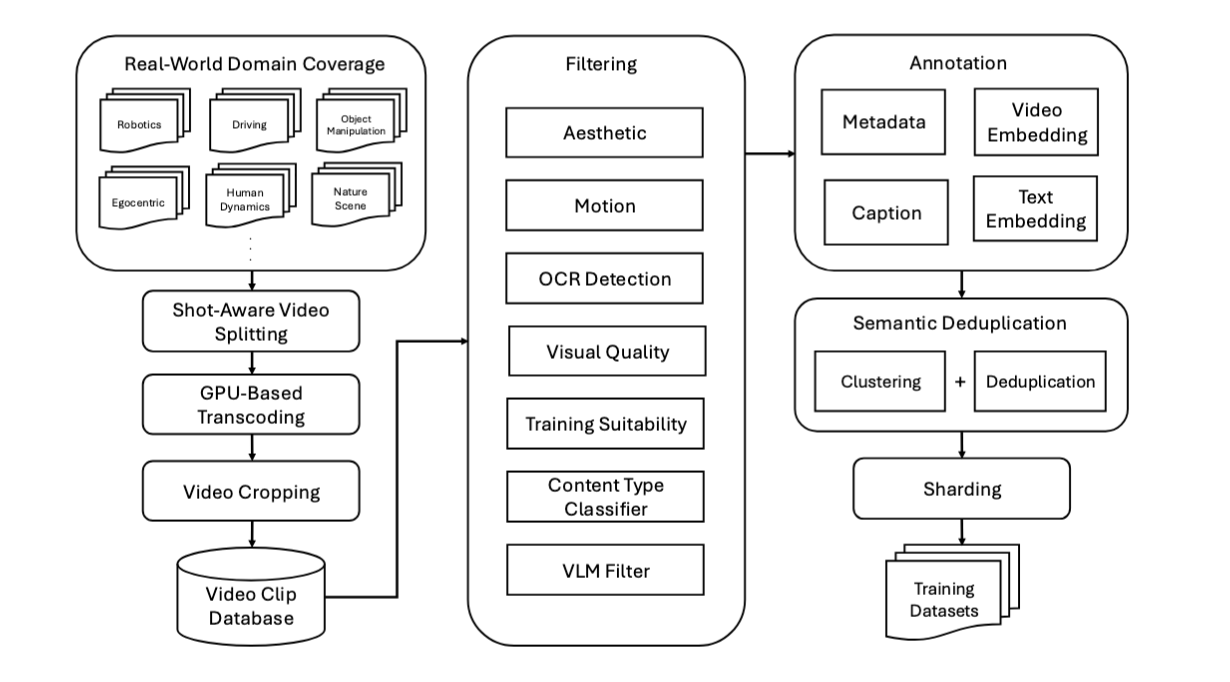
The Cosmos video curation pipeline—first established in Cosmos-Predict1 and later scaled in Cosmos-Predict2.5—consists of seven stages:
- Shot-Aware Video Splitting – Long-form videos are segmented into coherent clips using shot boundary detection. Short (<5 s) clips are discarded, while longer ones (5–60 s) form the basis for downstream curation.
- GPU-Based Transcoding – Each clip is transcoded in parallel to optimize format, frame rate, and compression quality for model ingestion.
- Video Cropping – Black borders, letterboxing, and spatial padding are removed to ensure consistent aspect ratios.
-
Filtering – A multi-stage filtering pipeline removes unsuitable data. Filters include:
-
Aesthetic Quality Filter – Screens for poor composition or lighting.
- Motion Filter – Removes clips with excessive or insufficient movement.
- OCR Filter – Detects overlays, watermarks, or subtitles.
- Perceptual Quality Filter – Detects technical distortions (blur, compression, noise).
- Semantic Artifacts Filter – Removes video-in-video effects or abrupt transitions.
- Vision-Language Model (VLM) Filter – Applies high-precision semantic validation using models such as Qwen2.5-VL.
- Content-Type Classifier – Excludes synthetic or non-physical content (e.g., games or animations).
Only around 4% of input clips survive this pipeline, forming a highly curated corpus of roughly 200 M clips from roughly 6 billion raw videos—spanning domains such as driving, object manipulation, navigation, human interaction, and natural scenes.
- Video Captioning – Each surviving clip is segmented into 5-second windows and captioned using a large vision-language model. Targeted prompt engineering ensures captions emphasize factual scene details—objects, motion, and context—at multiple lengths (short, medium, long). These captions serve as supervision signals and conditioning prompts for later training.
- Semantic Deduplication – Embedding-based clustering identifies near-duplicate clips. Within each cluster, the highest-resolution clip is kept. An online deduplication strategy supports incremental updates while maintaining semantic diversity.
- Structured Sharding – Clips are grouped along multiple axes: content type, resolution, aspect ratio, and temporal length. This structured dataset layout supports efficient sampling, curriculum-based training, and fine-grained domain balancing.
The result is a dataset that is clean, diverse, and semantically organized—a template for post-training curation workflows at any scale.
From Pre-Training to Post-Training
Although Cosmos-Predict2.5 operates at petabyte scale, its principles directly inform post-training data practices:
- Scale down, specialize up: Post-training uses smaller but more domain-specific datasets.
- Refine rather than expand: Instead of collecting more data, focus on improving alignment and removing noise.
- Iterate via feedback loops: Use model evaluation results to guide the next round of curation—closing the loop between data and learning outcomes.
In other words, post-training data curation inherits the structure of pre-training pipelines but applies it to targeted, feedback-driven refinement.
Data Sourcing
Data sourcing involves acquiring datasets from diverse locations—internal storage, public repositories, and the web—while ensuring ethical and license compliance.
Important: Always verify dataset usage rights, privacy policies, and redistribution terms before processing. Curation should prioritize transparency, data lineage tracking, and respect for original content sources.
Cloud Storage Tools
| Tool | Purpose | Best For |
|---|---|---|
| s5cmd | High-performance S3-compatible storage client | Large-scale parallel transfers |
| AWS CLI | Official AWS command-line tool | AWS-native workflows |
| rclone | Multi-cloud sync for 70+ providers | Complex multi-cloud setups |
Practical guidance: Use s5cmd for high-throughput S3 transfers (10-100x faster than AWS CLI for bulk operations). Use rclone when syncing across different cloud providers or when you need advanced features like encryption and bandwidth limiting.
Web Content Tools
| Tool | Purpose | Best For |
|---|---|---|
| HuggingFace CLI | Access to model/dataset repositories | Community datasets and checkpoints |
| yt-dlp | High-throughput video downloader | Batch ingestion and quality selection |
| wget/curl | General-purpose file downloaders | API retrieval and recursive crawling |
Physical AI Datasets
For Physical AI developers working with Cosmos models, NVIDIA provides open, curated, and commercial-grade datasets for Physical AI development in NVIDIA Physical AI Collection on Hugging Face, including:
- Autonomous vehicle datasets (driving scenes, synthetic data, teleoperation)
- Robotics datasets (GR00T, manipulation, grasping, navigation)
- Smart spaces and warehouse datasets
- Domain-specific training and evaluation datasets
These datasets are designed to work seamlessly with Cosmos models and can serve as starting points for domain-specific post-training workflows.
Data Processing Tools
| Tool | Purpose | Best For |
|---|---|---|
| ffmpeg | Video transcoding and frame extraction | Reformatting and quality control |
| PIL/Pillow | Python imaging library | Lightweight image manipulation |
Quality Control Tools
| Tool | Purpose | Best For |
|---|---|---|
| OpenCV | Computer vision toolkit | Visual inspection and analysis |
| FFprobe | Metadata extraction | Duration, codec, and resolution stats |
Data Sampling and Visualization
Before large-scale processing or filtering, it is critical to perform data analysis and sampling to understand the structure, quality, and coverage of your dataset. Effective sampling helps reveal issues such as compression artifacts, aspect ratio inconsistencies, or irrelevant content — problems that are far easier to correct before the main curation workflow begins.
At this stage, the goal is not to process the entire dataset, but to analyze representativeness and integrity. You should aim to answer questions such as:
- Does the dataset align with the target domain and intended post-training goal?
- Are there missing or overrepresented scene types?
- What kinds of artifacts, distortions, or noise are common?
- Is the metadata (if present) informative and reliable?
Recommended Analysis Practices
-
Consult Dataset Documentation When available, start by reading dataset cards, research papers, or technical reports describing the dataset’s collection process, quality guarantees, and known limitations. Understanding provenance and annotation methodology helps anticipate potential biases or failure modes.
-
Perform Structured Sampling Use randomized or stratified sampling to preview a manageable subset of videos. Evaluate visual quality, diversity, and semantic consistency before investing in large-scale processing.
-
Use Visualization Tools Sampling utilities—like the examples below—help quickly visualize data distribution and detect common quality issues.
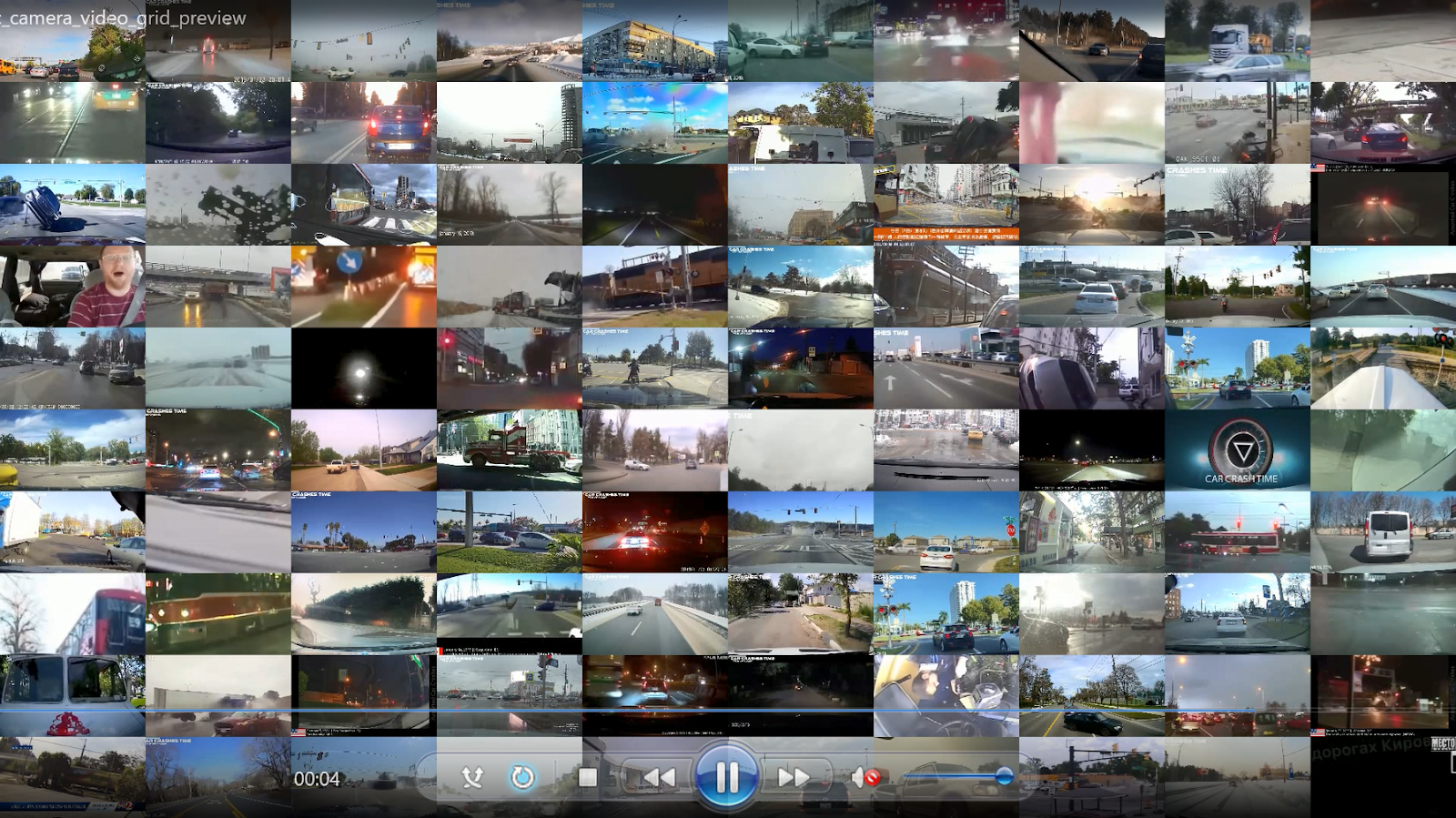
Grid Preview Generation
Grid preview videos provide at-a-glance dataset overviews by arranging multiple sampled videos into a single tiled visualization. This quick and efficient approach enables rapid quality assessment across large video collections without manual inspection of individual files, making it an ideal method for quickly understanding video datasets at scale.
Rationale: By resizing and arranging randomly sampled videos into a grid layout (e.g., 10×10), you can visually assess diversity, detect outliers, and identify quality issues in seconds. Each video is scaled to a uniform thumbnail size and played synchronously for a fixed duration, creating a comprehensive snapshot of your dataset's visual characteristics.
Implementation approach using ffmpeg's xstack filter:
# Sample 100 videos and create a 10x10 grid preview
ffmpeg -i video1.mp4 -i video2.mp4 ... -i video100.mp4 \
  -filter_complex "[0:v]scale=192:108,trim=duration=5[v0]; \
                   [1:v]scale=192:108,trim=duration=5[v1]; \
                   ... \
                   [99:v]scale=192:108,trim=duration=5[v99]; \
                   [v0][v1]...[v99]xstack=inputs=100:layout=0_0|192_0|...|1728_972[out]" \
  -map "[out]" -r 30 output_grid.mp4
Output Example:
Interactive Video Sampling
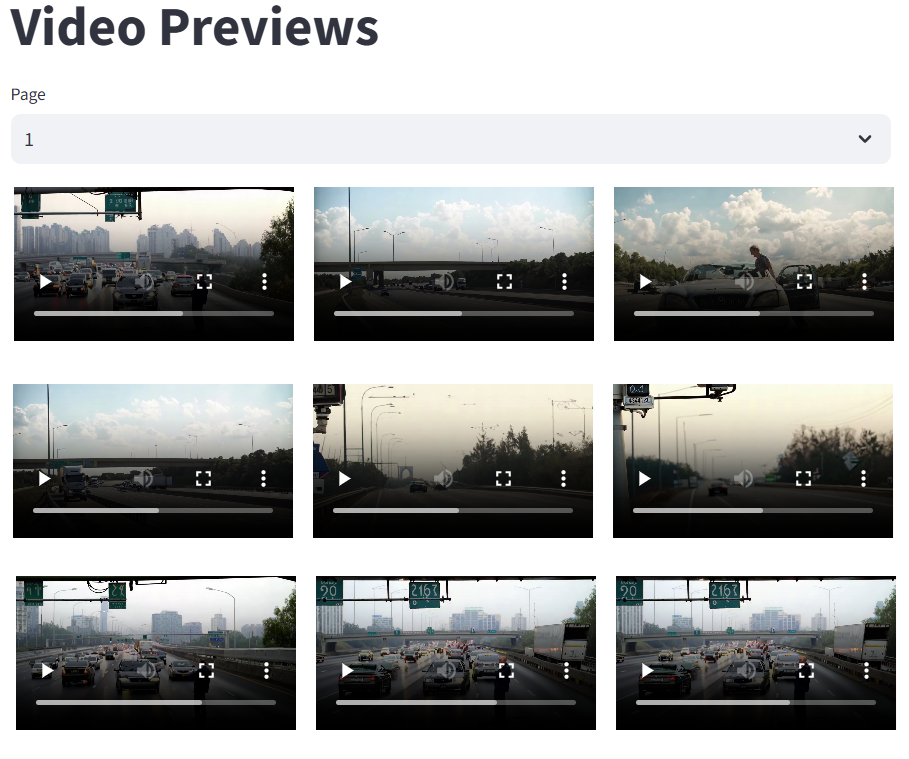
For more detailed inspection, an interactive web interface built with Streamlit enables paginated browsing and closer examination of individual videos. This approach is ideal when you need to analyze specific samples, compare similar videos, or make manual quality assessments.
Rationale: While grid previews provide rapid overviews, interactive browsing allows for deeper inspection—pausing, replaying, and examining metadata for each video. A paginated interface (e.g., 3×4 grid showing 12 videos per page) balances screen real estate with detailed viewing, making it practical to review hundreds of samples systematically.
Implementation approach using Streamlit:
import streamlit as st
import random
from pathlib import Path

# Sample videos from directory
def find_mp4_files(directory: str):
    return list(Path(directory).rglob("*.mp4"))

# Build interactive browser
st.title("Sample Video Browser")
all_videos = find_mp4_files(input_dir)
sampled_videos = random.sample(all_videos, nsamples)

# Pagination logic
videos_per_page = 12
total_pages = (len(sampled_videos) + videos_per_page - 1) // videos_per_page
page = st.number_input("Page", min_value=1, max_value=total_pages, value=1)

start_idx = (page - 1) * videos_per_page
end_idx = min(start_idx + videos_per_page, len(sampled_videos))
videos_to_show = sampled_videos[start_idx:end_idx]

# Display videos in 3x4 grid
for row in range(3):
    cols = st.columns(4)
    for col in range(4):
        idx = row * 4 + col
        if idx < len(videos_to_show):
            with cols[col]:
                st.video(str(videos_to_show[idx]))
                st.caption(videos_to_show[idx].name)
This creates a navigable interface where users can browse through sampled videos, with native playback controls and filename display for each video.
Sample Output:
Data Curation Best Practices
Effective curation begins long before the first filtering job runs. Success depends on understanding the dataset, establishing clear objectives, and iteratively validating quality throughout the process.
Key Principles
- Start with exploratory sampling — Analyze dataset composition and potential issues before automated processing.
- Apply filters strategically — Focus first on eliminating low-quality or irrelevant data.
- Iterate at small scale — Validate each stage on subsets before scaling up to full production.
- Use the right tools for the task — Combine visualization, transcoding, and filtering utilities for efficiency.
- Track lineage and versioning — Maintain reproducibility through consistent metadata and experiment logging.
- Consult available references — Dataset cards, academic papers, and internal documentation often contain valuable curation guidance.
Performance tip: For large-scale filtering runs, enable distributed processing via Ray. Cosmos Curator is built on Ray and supports parallel execution across multiple nodes, significantly accelerating filtering, captioning, and deduplication stages.
Next Steps: Core Curation
Once you have completed the data sourcing, sampling, and visualization phases outlined above, you're ready to move to the core curation stage. This involves the following:
- Video splitting into shorter, scene-coherent clips
- Automated captioning with sophisticated prompting strategies
- Quality filtering and content validation
- Dataset sharding for optimized training workflows