Cosmos Transfer 2.5 Control Modalities: Core Concepts
Authors: Aiden Chang • Akul Santhosh Organization: NVIDIA
Overview: The Control Challenge
This document serves as a comprehensive guide to the core concepts required for using the Transfer 2.5 video generation model. Success depends on understanding the balance between the Guidance Scale (your text prompt) and the influence of the four primary Control Modalities: Edge, Depth, Segmentation, and Vis.
Key Takeaway: Multi-control tuning--using a strategic combination of Edge, Vis, Depth, and Seg modalities--is required for achieving high-fidelity, structurally consistent video results.
1. Key Concepts: Governing Strength
1.1. Guidance Scale (Prompt Strength)
This principle dictates how strictly the model adheres to your text prompt versus the visual controls.
- What it does: Controls the influence of the text prompt.
- Good Starting Point: Guidance = 3
- When to Increase: Increase to 5+ if the visual output fails to incorporate the changes described in your prompt (e.g. trying to change a shirt into a specific texture).
1.2. Control Weight Normalization (Very Important)
This principle governs how the model balances the influence of multiple control modalities (e.g. Edge + Seg + Vis) against each other.
- Rule 1: Weights WILL NOT Normalize if the total sum of all control weights is 1.0 or less. The weights are applied as-is.
- Example: {seg: 0.2, edge: 0.2} (sum is 0.4) will be used as-is.
- Rule 2: Weights WILL NORMALIZE if the total sum is greater than 1.0. The weights are re-scaled proportionally so the new total sum equals 1.0.
- Example: {seg: 4.0, edge: 1.0} (sum is 5.0) will be normalized and run as {seg: 0.8, edge: 0.2}.
2. Technical Details: The Control Modalities
The system uses four primary modalities to inject structural, semantic, relative, and visual consistency into the video.
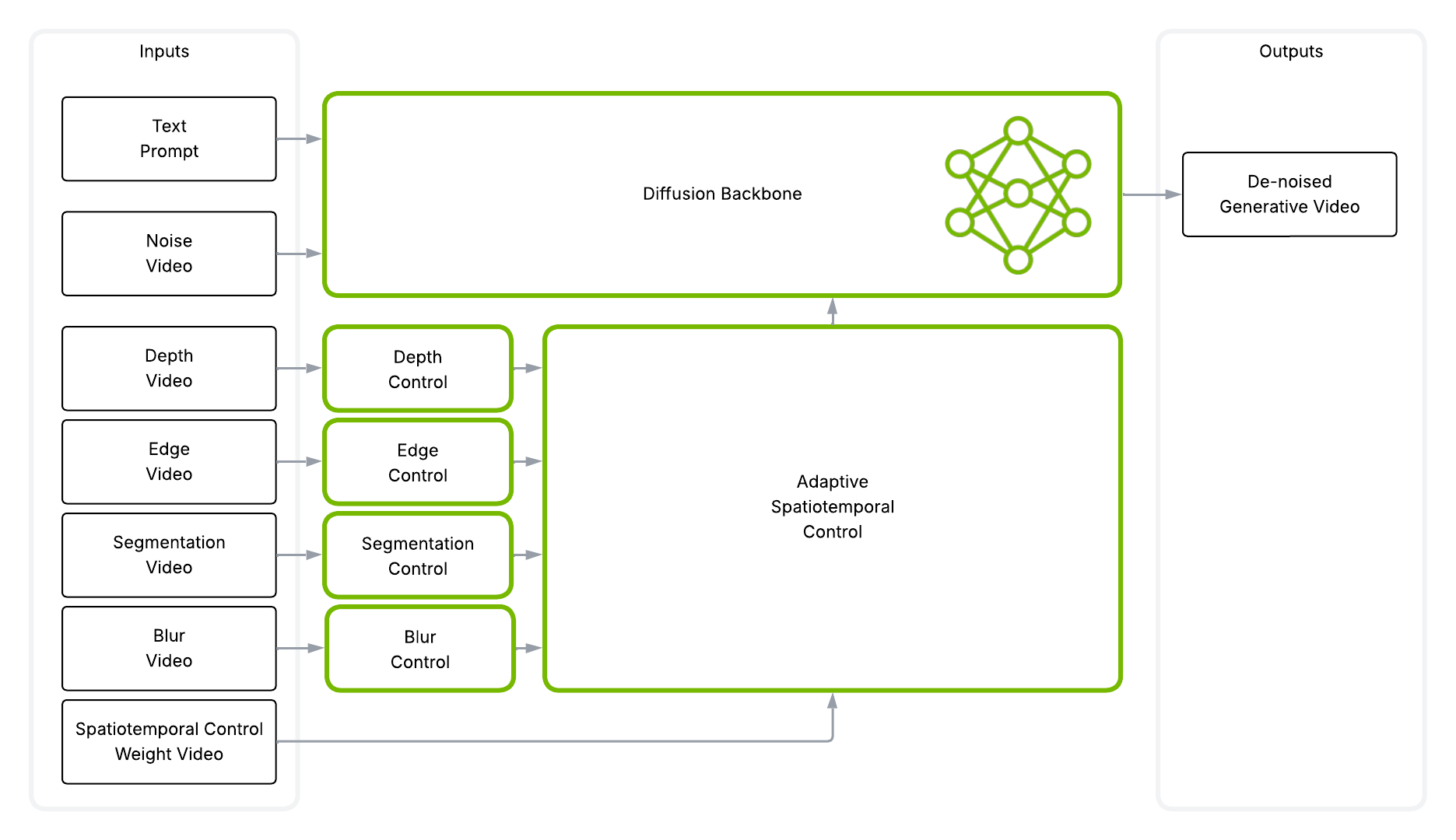
2.1. Edge Control (Structure Preservation)
- Function: Preserves the original structure, shape, and layout of the video.
- Best For: Changing textures, clothing, or lighting where the underlying shape must be maintained.
- Limitation: Performs poorly when attempting to drastically change an object's shape (e.g. turning a shirt into a banana).
Edge control is natively supported in the Cosmos Transfer 2.5 repository. Users may optionally supply their own edge-detection output by providing a control_path pointing to a precomputed edge-control video. If no control_path is provided, Cosmos Transfer 2.5 automatically generates the edge control modality on the fly.
When object and background contours are too similar, the default Canny edge detection may fail to distinguish them reliably. In these cases, pre-adjusting the brightness and contrast of the video can help produce a cleaner, more stable edge map before feeding it into the Cosmos Transfer 2.5 pipeline.
An example preprocessing implementation is shown below:
import cv2, os

def generate_edges(in_path, out_path):
    cap = cv2.VideoCapture(in_path)
    assert cap.isOpened(), "Could not open input video."
    fps = cap.get(cv2.CAP_PROP_FPS)
    w = int(cap.get(cv2.CAP_PROP_FRAME_WIDTH))
    h = int(cap.get(cv2.CAP_PROP_FRAME_HEIGHT))

    bright = 50
    contrast = 1.0

    fourcc = cv2.VideoWriter_fourcc(*"mp4v")  # use "avc1" if you prefer H.264 and it's available
    out = cv2.VideoWriter(out_path, fourcc, fps, (w, h), isColor=False)

    while True:
        ok, frame = cap.read()
        if not ok:
            break

        frame = cv2.convertScaleAbs(frame, alpha=contrast, beta=bright)
        gray = cv2.cvtColor(frame, cv2.COLOR_BGR2GRAY)
        blurred = cv2.GaussianBlur(gray, (3, 3), 1.4)
        edges = cv2.Canny(blurred, 10, 50)
        out.write(edges)
    cap.release()
    out.release()

if __name__ == "__main__":
    in_path = "input_video.mp4"
    out_path = "edges.mp4"
    generate_edges(in_path, out_path)
2.2. Segmentation (Seg) Control (Structural Change & Semantic Replacement)
- Function: Facilitates large, structural changes and semantic replacement. Used to completely transform or replace objects, people, or backgrounds.
- Best For: Generating realistic new objects/scenes where the prompt requires a large change.
- Limitation: High weights can lead to "hallucinations" (unrealistic or physically incorrect objects).
- Recommended Usage: Always use Seg with a mask of the parts you want to change, and always use it as part of a multi-control configuration (e.g. with Edge).
There are two ways to generate segmentation masks:
- Specify objects manually: You can provide the list of objects you want to segment and run the SAM2 endpoint in the Cosmos Transfer 2.5 repository. The implementation is available in the SAM2 pipeline code.
- Automatic object detection (recommended for scale): For larger datasets, you can use models like RAM++ to automatically detect objects. The detected object labels are then passed into the Cosmos Transfer 2.5 pipeline to generate segmentation masks using the same SAM2 workflow described above.
2.3. Vis Control (Lighting & Background Feel)
- Function: Preserves the original video's background, lighting, and overall appearance. By default, it applies a subtle smoothing/blur effect, but the underlying visual characteristics remain unchanged.
- Best For: Acting as a supplement to Edge or Seg, typically with a lower weight, to fine-tune visual consistency.
- Intuition:
- Increase Vis weight to keep more of the original video's look.
- Decrease Vis weight to allow more changes from the original (though a weight that is too low can increase background hallucinations).
- Limitation: If the weight is too high, it will just return your original video. Masking Vis control is known to cause hallucinations.
Vis control is natively built on the Cosmos Transfer 2.5 repository. There is no need to specify a control_path.
2.4. Depth Control
- Function: Maintains 3D realism and spatial consistency by respecting distance and perspective.
- Potential Use: Helps when placing new objects into a scene or maintaining camera movement integrity.
2.5 Examples
The figures below illustrate the different control modalities generated from the original video:
| Control Type | Description | Example |
|---|---|---|
| Original Video | Source video input | |
| Edge | Geometric boundaries of objects and infrastructure | |
| Segmentation | Semantic segmentation of the scene | |
| Vis | Blurred representation preserving background and lighting |
2.5. Binary Masking: Localizing Control
Masking is the technique used to apply a control modality to specific areas of the video frame.
- Mechanism: A binary mask (a black and white image/video) is used. The control modality is applied only to the white pixels in the mask.
- White Pixels: The area of change/control application.
- Black Pixels: The area that should remain unchanged or where the control is suppressed.
- Seg Masking (Standard): This is an effective and standard use of masking. You supply a mask to the Seg control input to tell it exactly where to perform the semantic replacement.
- Vis Masking (Avoid): Masking Vis control is known to cause visual hallucinations and is generally discouraged. Use Vis globally with a low weight instead.
3. Building Intuition: Multi-Control Tuning
To achieve complex goals like background replacement, you must strategically combine modalities.
| If Your Goal Is... | Increase This Setting | Decrease This Setting |
|---|---|---|
| Reduce hallucinations / weird objects | Seg weight or Guidance | |
| Preserve original background/lighting | Vis weight | |
| Keep the original video structure | Edge weight | |
| Make more realistic drastic changes | Seg weight | Vis weight |
| Keep object boundaries consistent | Edge weight | Vis weight |
The Background Replacement Walkthrough
The following steps illustrate how each control can build upon the last to achieve a high-fidelity result, starting from a base video. The objective is to change the original video background to an outside street type environment. This is not meant to be a recipe to perform a background change; instead, it is a walkthrough of how each control modality affects the result. Specific guidelines on how to generate these results can be found here.
Step 1: Edge Only (Base Structure)
The first step is often applying Edge control to keep the core structure (e.g. the human's gesture).
- Action: Apply Edge control using a filtered edge map (edges of only the human).
- Result Intuition: The human's motion is preserved, but the background still looks unrealistic and distorted. This shows that Edge only controls shape, not visual fidelity.
Step 2: Edge + Vis (Adding Lighting Consistency)
To fix the unrealistic look and preserve camera effects, Vis control is added.
- Action: Add Vis control with a medium weight (e.g. 0.6).
- Result Intuition: The fisheye distortion is more accurate, and the background is less blurry. This confirms the role of Vis in preserving overall visual feel and camera properties. However, overall realism is still lacking.
Step 3: Edge + Vis + Seg (Injecting Realism)
To generate a completely new and realistic background, Segmentation control is used.
- Action: Add Seg control with a moderate weight (e.g. 0.4), using a mask (white on the background) to direct the semantic replacement only to the background area.
- Result Intuition: The final output is visually sharp and consistent. Seg provides the semantic information necessary to generate a plausible, new environment, while Edge and Vis ensure the subject and lighting remain consistent.
Full recipes can be found at Real World Video Manipulation Guidelines with Cosmos Transfer 2.5.
Best Practices
Do:
- ✅ Use Multi-Control: Combine modalities (especially Seg + Edge) for complex tasks.
- ✅ Use a Mask with Seg: Provide a mask when using Seg control to isolate the area of change.
- ✅ Start with Lower Weights for Vis: Use Vis as a supplement with a lower weight (e.g. 0.4-0.6) to maintain visual feel.
Don't:
- ❌ Use Seg Control Alone: Do not use Segmentation control by itself; it leads to highly unrealistic results.
- ❌ Use Seg + Vis (without Edge): This combination is not recommended as it can lead to unpredictable outcomes.
- ❌ Mask Vis Control: Avoid masking Vis control as it is known to cause hallucinations.
- ❌ Use Vis with a High Weight: A very high Vis weight will just return your original video—use [lower weights] instead.
Use Cases
Document Information
Publication Date: November 9, 2025
Citation
If you use this content or reference this work, please cite it as:
@misc{cosmos_cookbook_control_modalities_2025,
  title={Cosmos Transfer 2.5 Control Modalities: Core Concepts},
  author={Chang, Aiden and Santhosh, Akul},
  year={2025},
  month={November},
  howpublished={\url{https://nvidia-cosmos.github.io/cosmos-cookbook/core_concepts/control_modalities/overview.html}},
  note={NVIDIA Cosmos Cookbook}
}
Suggested text citation:
Aiden Chang, & Akul Santhosh (2025). Cosmos Transfer 2.5 Control Modalities: Core Concepts. In NVIDIA Cosmos Cookbook. Accessible at https://nvidia-cosmos.github.io/cosmos-cookbook/core_concepts/control_modalities/overview.html