Leveraging World Foundation Models for Synthetic Trajectory Generation in Robot Learning
Author: Rucha Apte, Jingyi Jin, Saurav Nanda Organization: NVIDIA
| Model | Workload | Use Case |
|---|---|---|
| Cosmos Predict 2.5 | Post-training, Inference | Synthetic Trajectory Generation |
| Cosmos Reason 2 | Inference | Reasoning and filtering synthetic trajectories |
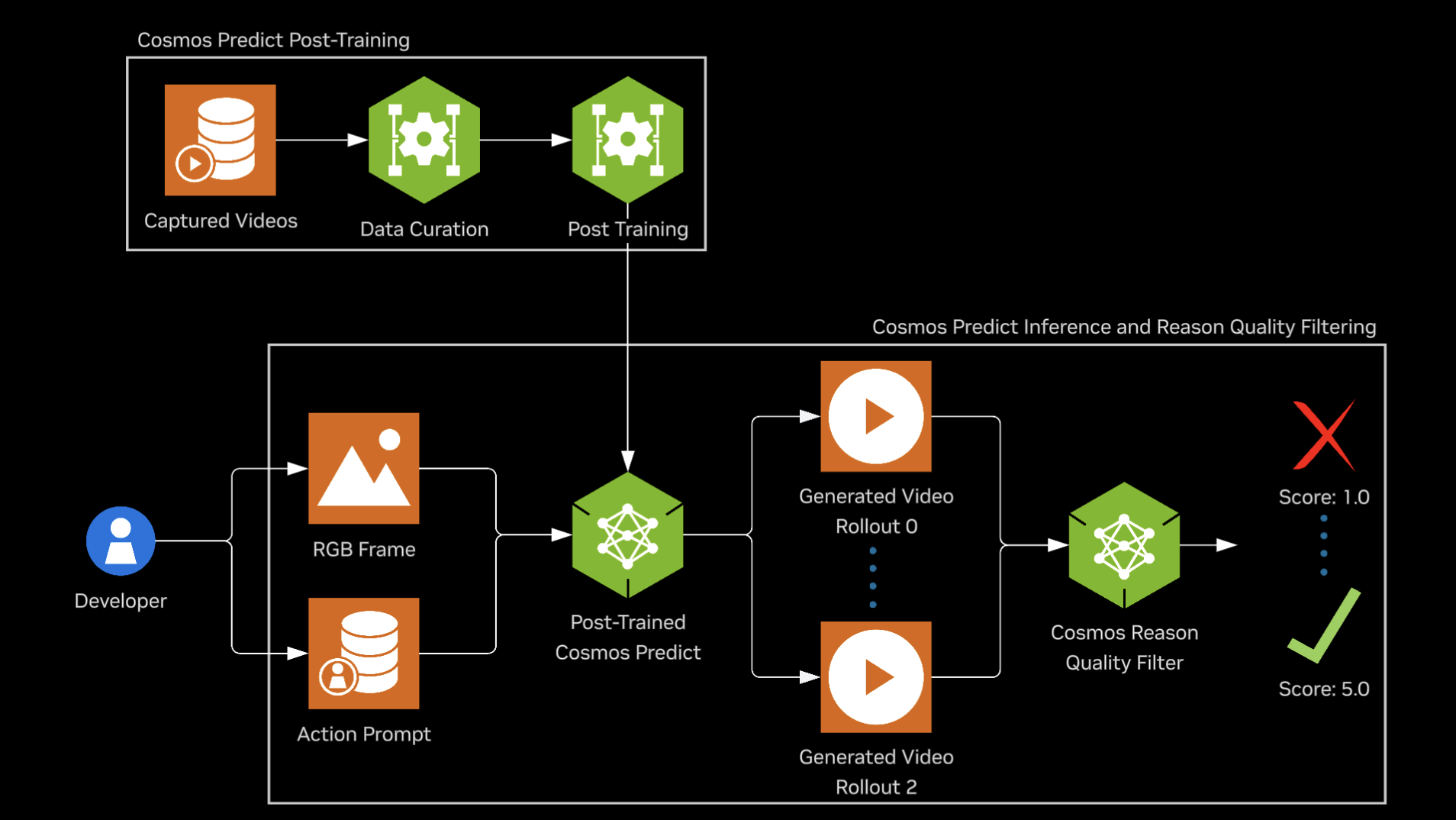
This guide walks you through post-training the Cosmos Predict 2.5 model on the PhysicalAI-Robotics-GR00T-GR1 open dataset to generate synthetic robot trajectories for robot learning applications. After post-training, we'll use the fine-tuned model to generate trajectory predictions on the PhysicalAI-Robotics-GR00T-Eval dataset. Finally, Cosmos Reason 2 is leveraged to evaluate these generated trajectories by assessing their physical plausibility, helping to quantify and filter for valid, realistic, and successful robot motions. The process includes the steps outlined below:
Motivation
Generalist robotics is emerging, driven by advances in mechatronics and robot foundation models, but scaling skill learning remains limited by the need for massive training data. NVIDIA Isaac GR00T-Dreams, built on NVIDIA Cosmos, addresses this by generating large-scale synthetic trajectory data from a single image and language prompt. This enables efficient training of models such as NVIDIA Isaac GR00T N1.5 for reasoning and skill learning. World foundation models predict or reason over future world states (e.g., video or trajectories) from current observations and language. In this recipe, Cosmos Predict 2.5 acts as a world model that generates synthetic trajectories, and Cosmos Reason 2 evaluates whether those trajectories adhere to physical laws.
Table of Contents
- Prerequisites
- Preparing Data
- Post-training Cosmos Predict
- Inference with Post-trained Cosmos Predict
- Converting DCP Checkpoint to Consolidated PyTorch Format
- Running Inference
- Policy Evaluation using Cosmos Predict
- Using Cosmos-Reason as Video Critic for Rejection Sampling
- Computing Metrics
- Limitations and Considerations
- Conclusion
Prerequisites
Follow the Setup guide for general environment setup instructions, including installing dependencies for Cosmos Predict 2.5 and Cosmos Reason 2.
1. Preparing Data
All steps in this section and through Multiple Video Rollouts Generation (Section 4) assume you are in the cosmos-predict2.5 repository root, unless a step specifies otherwise (e.g., Cosmos Reason 2 steps run from the cosmos-reason2 root). First, we will download the GR1 training dataset and then preprocess it to create text prompt txt files for each video.
Download DreamGen Bench Training Dataset
hf download nvidia/GR1-100 --repo-type dataset --local-dir datasets/benchmark_train/hf_gr1/ && \
mkdir -p datasets/benchmark_train/gr1/videos && \
mv datasets/benchmark_train/hf_gr1/gr1/*mp4 datasets/benchmark_train/gr1/videos && \
mv datasets/benchmark_train/hf_gr1/metadata.csv datasets/benchmark_train/gr1/
Preprocess DreamGen Bench Training Dataset
Upon running the above preprocessing, the dataset folder format should look like this:
Preview of the Training Dataset
| Input Prompt | Video File |
|---|---|
| The robot arm is performing a task. Use the right hand to pick up green bok choy from tan table right side to bottom level of wire basket. | |
| The robot arm is performing a task. Use the right hand to pick up rubik's cube from top level of the shelf to bottom level of the shelf. | |
| The robot arm is performing a task. Use the right hand to pick up banana from teal plate to wooden table. |
2. Post Training Cosmos Predict
For this tutorial we will post train Cosmos-Predict2.5 2B model. The 14B post-training is very similar to the 2B example below. Run the following command to execute an example post-training job with GR1 data.
torchrun --nproc_per_node=1 --master_port=12341 -m scripts.train --config=cosmos_predict2/_src/predict2/configs/video2world/config.py -- experiment=predict2_video2world_training_2b_groot_gr1_480
Note: To disabling W&B Logging, add job.wandb_mode=disabled in the above command
This script makes use of predict2_video2world_training_2b_groot_gr1_480 config. See the job config below to understand how they are determined.
predict2_video2world_training_2b_groot_gr1_480 = dict(
    ...,
    dataloader_train=dataloader_train_gr1,
    ...,
    job=dict(
        project="cosmos_predict_v2p5",
        group="video2world",
        name="2b_groot_gr1_480",
    ),
    ...,
)
Checkpoints are saved to ${IMAGINAIRE_OUTPUT_ROOT}/PROJECT/GROUP/NAME/checkpoints. By default, IMAGINAIRE_OUTPUT_ROOT is /tmp/imaginaire4-output. In the above example, PROJECT: cosmos_predict_v2p5, GROUP: video2world, NAME: 2b_groot_gr1_480. Checkpoints will be saved in Distributed Checkpoint (DCP) Format.
Example directory structure:
checkpoints/
├── iter_{NUMBER}/
│   ├── model/
│   │   ├── .metadata
│   │   └── __0_0.distcp
│   ├── optim/
│   ├── scheduler/
│   └── trainer/
└── latest_checkpoint.txt
3. Inference with Post Trained Cosmos Predict
3.1 Converting DCP Checkpoint to Consolidated PyTorch Format
Since the checkpoints are saved in DCP format during training, you need to convert them to consolidated PyTorch format (.pt) for inference. Use the convert_distcp_to_pt.py script:
# Get path to the latest checkpoint
CHECKPOINTS_DIR=${IMAGINAIRE_OUTPUT_ROOT:-/tmp/imaginaire4-output}/cosmos_predict_v2p5/video2world/2b_groot_gr1_480/checkpoints
CHECKPOINT_ITER=$(cat $CHECKPOINTS_DIR/latest_checkpoint.txt)
CHECKPOINT_DIR=$CHECKPOINTS_DIR/$CHECKPOINT_ITER

# Convert DCP checkpoint to PyTorch format
python scripts/convert_distcp_to_pt.py $CHECKPOINT_DIR/model $CHECKPOINT_DIR
This conversion will create three files:
model.pt: Full checkpoint containing both regular and EMA weightsmodel_ema_fp32.pt: EMA weights only in float32 precisionmodel_ema_bf16.pt: EMA weights only in bfloat16 precision (recommended for inference)
3.2 Running Inference
After converting the checkpoint, you can run inference with your post-trained model using the command-line interface.
Single Video Generation
torchrun --nproc_per_node=8 examples/inference.py \
  -i assets/sample_gr00t_dreams_gr1/gr00t_image2world.json \
  -o outputs/gr00t_gr1_sample \
  --checkpoint-path $CHECKPOINT_DIR/model_ema_bf16.pt \
  --experiment predict2_video2world_training_2b_groot_gr1_480
Note: For a single video, --nproc_per_node=1 is usually sufficient. Use 8 GPUs when you need higher throughput with batched inputs; adjust to your setup.
Below is an example visualizing the batch inference output.
| Prompt | Input Image | Generated Video |
|---|---|---|
| Use the right hand to pick up red apple from brown tray to beige placemat. | 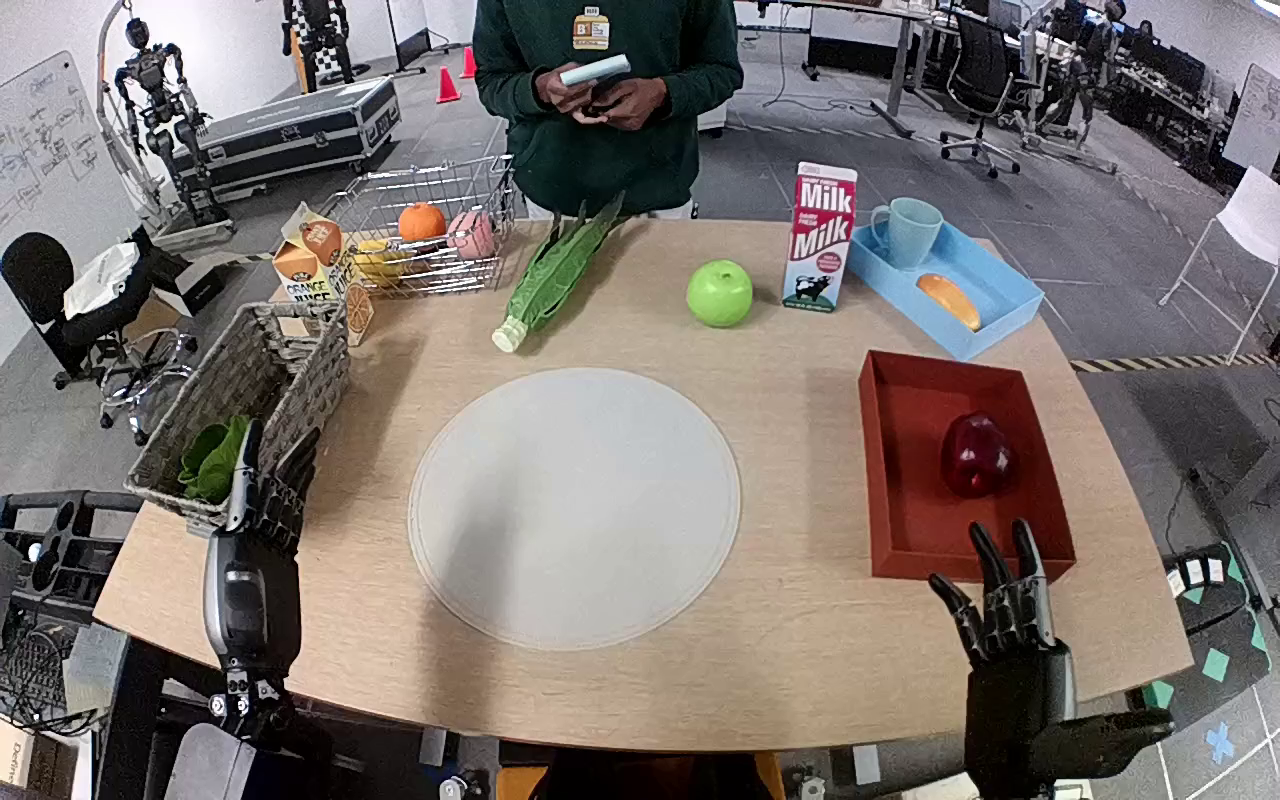 |
4. Policy Evaluation using Cosmos Predict
Lastly, we will download the GR00T Eval Dataset and then preprocess it to create batch input. The steps below are run from the cosmos-predict2.5 repository root.
Download the DreamGen Benchmark dataset
Prepare batch input json
python -m scripts.prepare_batch_input_json \
  --dataset_path dream_gen_benchmark/gr1_object/ \
  --save_path output/dream_gen_benchmark/cosmos_predict2_14b_gr1_object/ \
  --output_path dream_gen_benchmark/gr1_object/batch_input.json
Preprocess batch input for inference input
For generating multiple videos with different inputs and prompts, you can use a JSONL file with batch inputs. The JSONL file should contain an array of objects, where each object has:
# Adjust paths based on where you cloned the repositories
cp -r cosmos-cookbook/scripts/examples/predict2.5/gr00t-dreams/gr1_batch_to_jsonl.py cosmos-predict2.5/scripts/
Run the following from the cosmos-predict2.5 repository root so that the script’s paths (dream_gen_benchmark/gr1_object/batch_input.json and gr1_batch.jsonl) resolve to your downloaded and prepared eval data:
After running the above script, the jsonl file will have following structure:
{"inference_type": "image2world", "name": "000_11_Use_the_right_hand_to_pick_up_green_pepper_from_black_shelf_to_inside_brown_p", "prompt": "Use the right hand to pick up green pepper from black shelf to inside brown paper bag.", "input_path": "11_Use the right hand to pick up green pepper from black shelf to inside brown paper bag..png", "num_output_frames": 93, "resolution": "432,768", "seed": 0, "guidance": 7}
Multiple Video Rollouts Generation
Using the same input, the Cosmos Predict2.5 generates multiple video rollouts. Among these, some exhibit greater physical plausibility than others.
# Adjust paths based on where you cloned the repositories
cp -r cosmos-cookbook/scripts/examples/predict2.5/gr00t-dreams/inference.py cosmos-predict2.5/
cp -r cosmos-cookbook/scripts/examples/predict2.5/gr00t-dreams/config.py cosmos-predict2.5/
Run the following from the cosmos-predict2.5 repository root so that the copied inference.py and config.py are used:
torchrun --nproc_per_node=1 inference.py \
  -i dream_gen_benchmark/gr1_object/gr1_batch.jsonl \
  -o outputs/gr1_object_run_ng5 \
  --num-generations 5 \
  --checkpoint-path $CHECKPOINT_DIR/model_ema_bf16.pt \
  --experiment predict2_video2world_training_2b_groot_gr1_480
| Generation 1 | Generation 2 | Generation 3 | Generation 4 | Generation 5 |
|---|---|---|---|---|
5. Using Cosmos Reason as Video Critic for Rejection Sampling
Cosmos Reason2 is capable of evaluating if a video adheres to fundamental physical laws such as Gravity, Object Permanency, Collision dynamics, and Cause-and-effect relationships. When paired with a world model such as Cosmos Predict2.5, it enables best-of-N sampling by generating multiple video candidates and selecting the most physically accurate ones, thereby improving generation quality. This recipe uses Cosmos Reason 2 in a zero-shot manner (no fine-tuning of the critic). For fine-tuning the critic on physical-plausibility data, see Physical Plausibility Prediction with Cosmos Reason 2.
Evaluation Criteria
Each generated video receives human evaluations based on adherence to physical laws using a standardized 5-point scale:
| Score | Description | Physics Adherence |
|---|---|---|
| 1 | No adherence to physical laws | Completely implausible |
| 2 | Poor adherence to physical laws | Mostly unrealistic |
| 3 | Moderate adherence to physical laws | Mixed realistic/unrealistic |
| 4 | Good adherence to physical laws | Mostly realistic |
| 5 | Perfect adherence to physical laws | Completely plausible |
Zero Shot Inference
Prompt for Scoring Physical Plausibility
system_prompt: "You are a helpful assistant."
user_prompt: |
  You are a helpful video analyzer. Evaluate whether the video follows physical commonsense.

  Evaluation Criteria:
  1. **Object Behavior:** Do objects behave according to their expected physical properties (e.g., rigid objects do not deform unnaturally, fluids flow naturally)?
  2. **Motion and Forces:** Are motions and forces depicted in the video consistent with real-world physics (e.g., gravity, inertia, conservation of momentum)?
  3. **Interactions:** Do objects interact with each other and their environment in a plausible manner (e.g., no unnatural penetration, appropriate reactions on impact)?
  4. **Consistency Over Time:** Does the video maintain consistency across frames without abrupt, unexplainable changes in object behavior or motion?

  Instructions for Scoring:
  - **1:** No adherence to physical commonsense. The video contains numerous violations of fundamental physical laws.
  - **2:** Poor adherence. Some elements follow physics, but major violations are present.
  - **3:** Moderate adherence. The video follows physics for the most part but contains noticeable inconsistencies.
  - **4:** Good adherence. Most elements in the video follow physical laws, with only minor issues.
  - **5:** Perfect adherence. The video demonstrates a strong understanding of physical commonsense with no violations.

  Response Template:
  Analyze the video carefully and answer the question according to the following template:
  [Score between 1 and 5.]

  Example Response:
  2

  Does this video adhere to the physical laws?
To run zero-shot inference, you need to clone both repositories and copy the necessary files:
# Adjust paths based on where you cloned the repositories
cp -r cosmos-cookbook/scripts/examples/predict2.5/gr00t-dreams/inference_videophy2.py cosmos-reason2/examples/gr00t-dreams
cp cosmos-cookbook/docs/recipes/end2end/gr00t-dreams/assets/video_reward.yaml cosmos-reason2/prompts/video_reward.yaml
Run inference on the generated videos using Cosmos Reason 2. From the Cosmos Reason 2 project root directory:
uv run examples/gr00t-dreams/inference_videophy2.py \
  --video-dir ./cosmos-predict2.5/outputs/gr1_object_run \
  --output-dir outputs/gr1_object_run_critic
The above script will generate a json with scores and explanation for each generated video.
| Score | Video Link | Reason2 Explanation |
|---|---|---|
| 4.0 | The video shows two robotic arms working together to pack items into a paper bag. The left arm holds the bag open while the right arm places a green bell pepper into it. Both arms move smoothly and deliberately, demonstrating coordination and precision. The person in the background observes the process without interfering. All actions are consistent with real-world physics, showing no signs of unrealistic behavior or violations of physical laws. Objects interact naturally, and motions are fluid and logical. | |
| 1.0 | The robot arm fails to grasp the green bell pepper, which contradicts its intended function. The lack of successful grasping suggests a malfunction or error in the programming controlling the robot's movements. Additionally, the person's hand remains stationary throughout the video, showing no interaction with the objects on the table, which is inconsistent with typical human behavior during such tasks. |
6. Computing Metrics
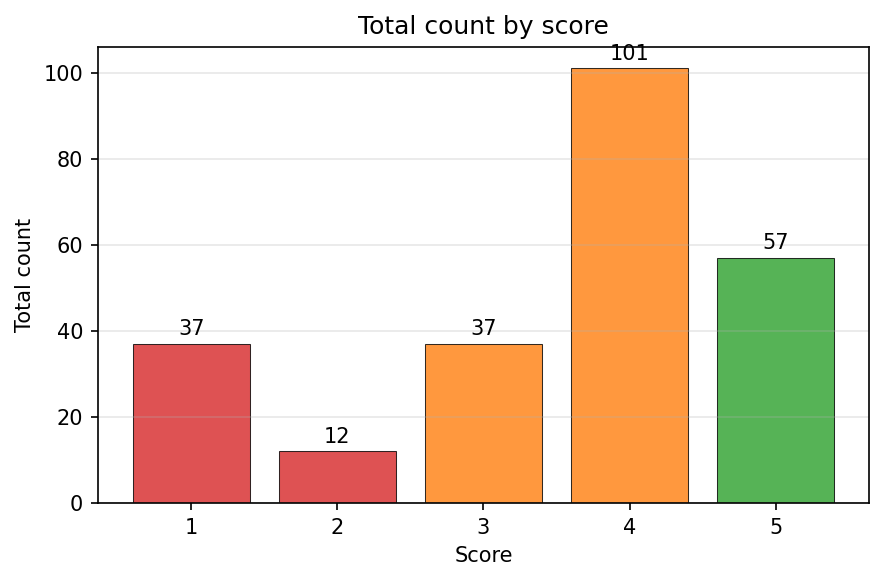
Under the Physical Plausibility criteria, you can filter your synthetic videos by removing those that received scores of 1.0 or 2.0, as they demonstrate poor or no adherence to physical laws. It is recommended to keep videos that received higher scores of 4.0 or 5.0, which indicate good or perfect physical realism.
Limitations and Considerations
When using this pipeline for education or deployment, keep the following in mind:
- Synthetic vs. real data: Generated trajectories are drawn from a learned distribution; they can be physically plausible yet still differ from real robot data. Downstream policies may face a sim-to-real gap when trained only on such synthetic data.
- Critic as a proxy: The Reason 2 video critic is a proxy for physical plausibility, not a ground-truth oracle. It can miss fine-grained physics or be sensitive to prompt and scale. Best-of-N sampling improves quality but does not guarantee correctness.
- Domain and scale: Behavior is strongest for setups and prompts similar to GR1/GR00T-style manipulation. Generalization to very different robots or tasks may require more data or tuning. Best-of-N and multiple roll outs increase compute cost; balance quality versus throughput as needed.
7. Conclusion
- End-to-end pipeline: Prepare GR1 data → post-train Cosmos Predict 2.5 on robot manipulation → run inference to generate multiple video rollouts per prompt → score rollouts with Cosmos Reason 2 → filter by physical plausibility and compute metrics.
- Best-of-N rejection sampling: Generate several candidates per prompt and keep only high-scoring (4.0 or 5.0) videos to build a curated, physically plausible trajectory dataset for robot learning.
- Scalable synthetic data: Use world foundation models (Predict + Reason) to produce and quality-filter synthetic trajectories at scale without manual labeling.
- Cosmos Reason 2 as critic: Use the video critic to assess adherence to physical laws (gravity, collisions, cause-and-effect) on a 1–5 scale and retain only plausible rollouts for downstream training.
Citation
If you use this recipe or reference this work, please cite it as:
@misc{cosmos_cookbook_gr00t_2026,
  title={Leveraging World Foundation Models for Synthetic Trajectory Generation in Robot Learning},
  author={Apte, Rucha and Jin, Jingyi and Nanda, Saurav},
  organization={NVIDIA},
  year={2026},
  month={March},
  howpublished={\url{https://nvidia-cosmos.github.io/cosmos-cookbook/recipes/end2end/gr00t-dreams/post-training.html}},
  note={NVIDIA Cosmos Cookbook}
}
Suggested text citation:
Rucha Apte, Jingyi Jin, Saurav Nanda (2026). Leveraging World Foundation Models for Synthetic Trajectory Generation in Robot Learning. In NVIDIA Cosmos Cookbook. NVIDIA. Accessible at https://nvidia-cosmos.github.io/cosmos-cookbook/recipes/end2end/gr00t-dreams/post-training.html