Style-Guided Video Generation with Cosmos Transfer 2.5
Authors: Fangyin Wei • Aryaman Gupta Organization: NVIDIA
Overview
| Model | Workload | Use Case |
|---|---|---|
| Cosmos Transfer 2.5 | Inference | Style-guided video generation using image references |
Cosmos Transfer 2.5 introduces a powerful new capability: generating videos that combine structural control (edge/depth/segmentation) with style guidance from reference images. This enables users to create videos that maintain specific visual aesthetics while following precise motion and structure patterns.
Key Features
- Image-Guided Style Transfer: Use any image as a style reference for video generation
- Multi-Modal Control: Combine edge/depth/segmentation control with image prompts
- Flexible Style Application: Control how strongly the reference image influences the output
- Temporal Consistency: Maintains coherent style across all video frames
How It Works
- Input Control Video: Provide structural guidance through edge, depth, or segmentation
- Style Reference Image: Supply an image that defines the desired visual style without changing the structure guided by the input control video
- Text Prompt: Describe the scene and desired output
- Model Processing: Transfer 2.5 combines all inputs to generate stylized video
Note: While Cosmos Transfer 2.5 includes four control checkpoints (edge, blur, depth, and segmentation), the image prompt feature is only supported for edge, depth, and segmentation controls. Blur control is not compatible with image prompts as it already incorporates color and style guidance, making additional image prompts redundant and potentially conflicting.
Dataset and Setup
Input Data Requirements
For style-guided video generation, you need:
- A control video (edge, depth, or segmentation)
- A style reference image (JPEG/PNG)
- A text prompt describing the desired output
Data Structure
The pipeline expects inputs in the following format:
input_directory/
├── control_video.mp4    # Edge/depth/segmentation video
├── style_image.jpg      # Reference image for style
└── prompt.txt           # Text description
Results
The following two examples demonstrate how different environmental styles can be applied to the same edge-controlled motion:
Example 1
Text Prompt:
"The camera moves steadily forward, simulating the perspective of a vehicle driving down the street. This forward motion is smooth, without any noticeable shaking or abrupt changes in direction, providing a continuous view of the urban landscape. The video maintains a consistent focus on the road ahead, with the buildings gradually receding into the distance as the camera progresses. The overall atmosphere is calm and quiet, with no pedestrians or vehicles in sight, emphasizing the emptiness of the street."
| Input | ||
| Edge Control |
Sunny Style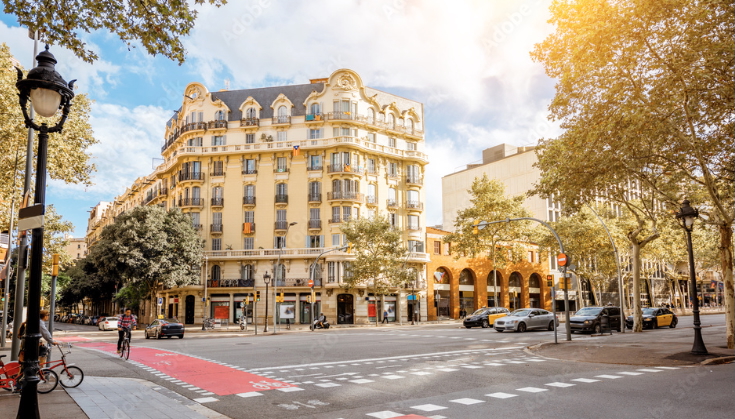 |
Sunset Style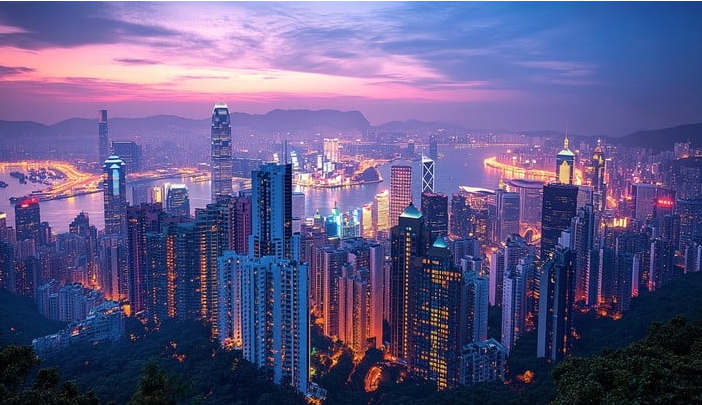 |
| Output | ||
| Base Generation |
Sunny Style Applied |
Sunset Style Applied |
Example 2
Text Prompt:
"A scenic drive unfolds along a coastal highway. The video captures a smooth, continuous journey along a multi-lane road, with the camera positioned as if from the perspective of a vehicle traveling in the right lane. The road is bordered by a tall, green mountain on the right, which casts a shadow over part of the highway, while the left side opens up to a view of the ocean, visible in the distance beyond a row of low-lying vegetation and a sidewalk. Several vehicles, including two red vehicles, travel ahead, maintaining a steady pace. The road is well-maintained, with clear white lane markings and a concrete barrier separating the lanes from the mountain covered by trees on the right. Utility poles and power lines run parallel to the road on the left, adding to the infrastructure of the scene. The camera remains static, providing a consistent view of the road and surroundings, emphasizing the serene and uninterrupted nature of the drive."
| Input | ||
| Edge Control |
Darker Style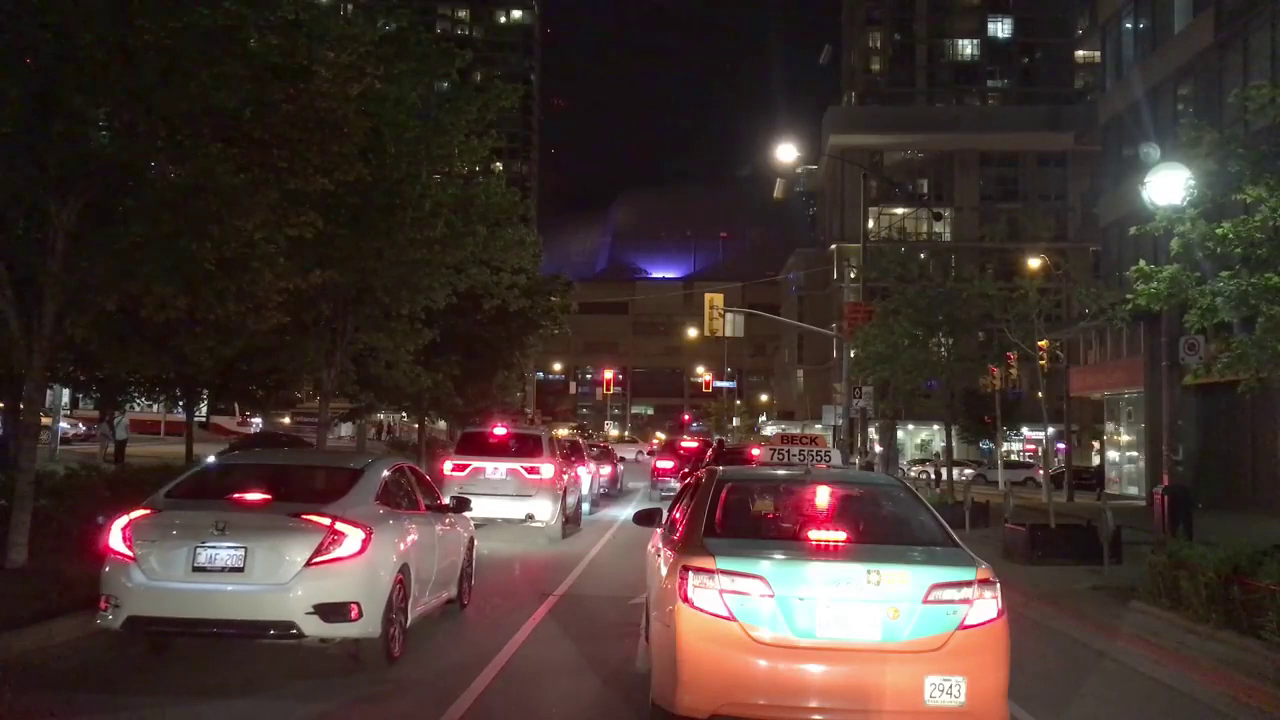 |
Greener Style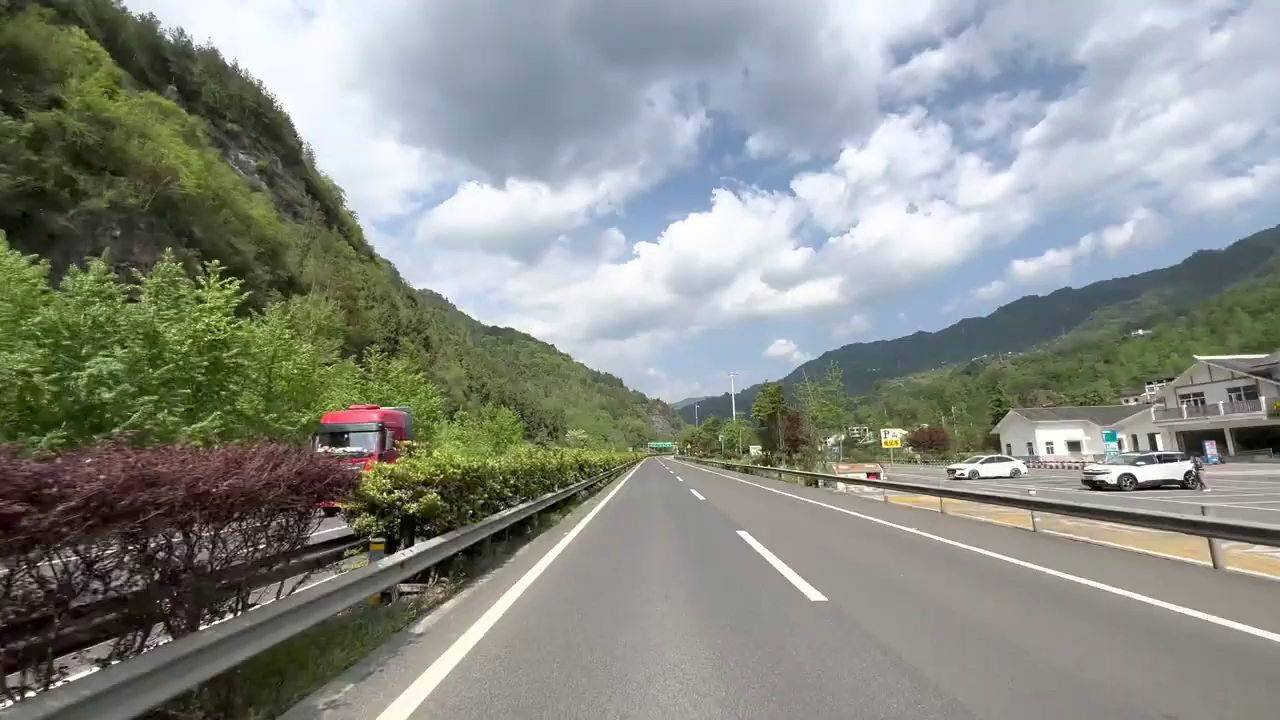 |
| Output | ||
| Base Generation |
Darker Mood Applied |
Greener Tone Applied |
Key Observations
- Style Preservation: The reference image's color palette, lighting, and mood are successfully transferred to the generated video
- Structure Maintenance: Edge control ensures consistent motion and object boundaries across all style variations
- Temporal Coherence: Style remains consistent throughout the video sequence
- Flexible Application: Different styles can dramatically change the video's atmosphere while preserving the underlying motion
Configuration Examples
Basic Style-Guided Generation
Below is an example JSON input to run the released code and generate the sunset output shown in example 1.
{
    "name": "image_style",
    "prompt": "The camera moves steadily forward, simulating the perspective of a vehicle driving down the street. This forward motion is smooth, without any noticeable shaking or abrupt changes in direction, providing a continuous view of the urban landscape. The video maintains a consistent focus on the road ahead, with the buildings gradually receding into the distance as the camera progresses. The overall atmosphere is calm and quiet, with no pedestrians or vehicles in sight, emphasizing the emptiness of the street.",
    "video_path": "calm_street.mp4",
    "image_context_path": "sunset.jpg",
    "seed": 1,
    "edge": {
    }
}
Configuration Parameters
| Parameter | Description | Required |
|---|---|---|
name |
Identifier for this generation job | Yes |
prompt |
Text description of the desired output scene | Yes |
video_path |
Path to the input RGB video (used to generate control signals) | Yes |
image_context_path |
Path to the style reference image (JPEG/PNG) | Yes |
seed |
Random seed for reproducibility | No |
edge / depth / seg |
Control modality configuration (use one) | Yes |
control_weight |
Strength of structural control (0.0-1.0, default: 1.0) | No |
Control Modality Options
You can use different control types depending on your needs. Only edge, depth, and segmentation support image prompts:
// Edge control - preserves structure and shape
{ "edge": { "control_weight": 1.0 } }

// Depth control - maintains 3D spatial consistency
{ "depth": { "control_weight": 1.0 } }

// Segmentation control - enables semantic replacement
{ "seg": { "control_weight": 0.8 } }
Best Practices
Style Image Selection
- Lighting Consistency: Choose reference images with lighting that matches your intended scene
- Color Harmony: Select images with color palettes that complement your content
- Quality Matters: High-resolution reference images produce better style transfer
- Contextual Relevance: Images with similar environments work best
Parameter Tuning
- Control Weight: Balance between structure preservation and style flexibility
- Higher for precise motion tracking
-
Lower for more artistic interpretation
-
Guidance Scale: Affects adherence to both the text prompt and reference image
- Higher values: Increased influence from both text prompt and reference image
Applications
- Film and Animation: Apply consistent visual styles across scenes
- Content Creation: Transform videos to match brand aesthetics
- Artistic Expression: Create unique visual interpretations
- Environmental Simulation: Generate videos in different lighting/weather conditions
- Style Consistency: Maintain visual coherence across video series
Troubleshooting
Common Issues and Solutions
Style Not Applying Strongly Enough
- Increase guidance parameter
- Use more distinctive reference images
- Adjust prompt to emphasize style elements
Loss of Motion Coherence
- Increase control_weight for edge/depth/segmentation
- Reduce guidance if it's too dominant
- Ensure control video quality is high
Color Bleeding or Artifacts
- Check reference image quality
- Reduce guidance scale
- Adjust guidance and control weight balance
Resources
- Cosmos Transfer 2.5 Model - Model weights and documentation
- Control Modalities Guide - Understanding different control types
Document Information
Publication Date: December 20, 2025
Citation
If you use this recipe or reference this work, please cite it as:
@misc{cosmos_cookbook_styleguided_video_generation_2025,
  title={Style-Guided Video Generation with Cosmos Transfer 2.5},
  author={Wei, Fangyin and Gupta, Aryaman},
  year={2025},
  month={December},
  howpublished={\url{https://nvidia-cosmos.github.io/cosmos-cookbook/recipes/inference/transfer2_5/inference-image-prompt/inference.html}},
  note={NVIDIA Cosmos Cookbook}
}
Suggested text citation:
Fangyin Wei, & Aryaman Gupta (2025). Style-Guided Video Generation with Cosmos Transfer 2.5. In NVIDIA Cosmos Cookbook. Accessible at https://nvidia-cosmos.github.io/cosmos-cookbook/recipes/inference/transfer2_5/inference-image-prompt/inference.html